A cleaning company does not need a CRM in the way a software reseller or a recruitment agency does. The deals are small, they repeat, and the only reason you keep a record of the customer is so the next job goes on the right day at the right house. A cleaning CRM is really scheduling software with a contact record attached. Pipeline tools built for long B2B sales cycles do too much and charge per seat for the privilege. Field service tools charge per plan and include a small number of users, which fits a cleaning team better than per-seat pricing does.
The arithmetic below uses the published prices for both shapes. It is followed by a list of the questions a website chat agent can answer before anyone in the office picks up the phone, because that is the highest-volume piece of your inbound work and it does not need a sales pipeline at all.
Most cleaning companies start looking for a CRM because they have outgrown a paper diary or a shared spreadsheet. The candidates split quickly into two groups. Zoho CRM and Pipedrive are general sales CRMs that price per user. Jobber and Housecall Pro are field service platforms that price per plan and include a fixed number of users. HubSpot sits between the two, with a free CRM and per-seat Sales Hub pricing on top. The shape of the bill is different in each group, and the shape is the decision before the brand.
Why a cleaning pipeline is not like a B2B pipeline
A B2B CRM tracks a deal that takes weeks to close, multiple stakeholders, a proposal, a contract and a renewal. Pipedrive and HubSpot are built around that motion. Their funnels assume a deal gets bigger as it moves down the stages.
Cleaning is the opposite. The deal is small (often under $200 for a one-off clean, $80 to $300 a month for regular work), the buyer is usually one person, and they either book or they do not. There is no proposal stage. There is no renewal motion because most residential cleans are open-ended and most commercial cleans auto-renew on a contract. A 12-stage pipeline with probability weighting per stage is ceremony around a yes-or-no decision.
What you actually need to track per customer is:
- Their address and access notes (gate code, alarm, key in lockbox, pets).
- Their service plan (frequency, rooms, any extras such as oven or fridge).
- The day of the week and the time window they expect.
- Who is assigned to that job and what they earned on it.
- Whether the last visit had a complaint, and what it was.
That is a contact record plus a recurring schedule plus a job history. Jobber and Housecall Pro are designed around exactly those four fields. Zoho CRM and Pipedrive will give you the contact record and the history, but you build the scheduling yourself, and scheduling is the thing that takes the most admin time.
Two ways the bill is shaped
Per-seat CRM pricing charges every person who logs in. A residential cleaning company with an owner, an office coordinator and three cleaners is five seats. A commercial cleaning company with two supervisors and ten cleaners is twelve seats. Per-seat pricing scales with team size, and it scales forever.
Per-plan field service pricing charges one fee that includes a fixed number of users, with extras sold on top. The same five-person team fits one plan tier. The same twelve-person team fits the next. The bill does not rise by one person at a time; it rises in steps when the team crosses a tier boundary.
Which shape is cheaper depends on team size and turnover. Per-seat is cheaper when the team is one or two people and most of the work is done by the owner. Per-plan is cheaper when the team is five or more people who all need to see the schedule, because the tier that includes them is priced for the team rather than per head.
What the field service tools publish
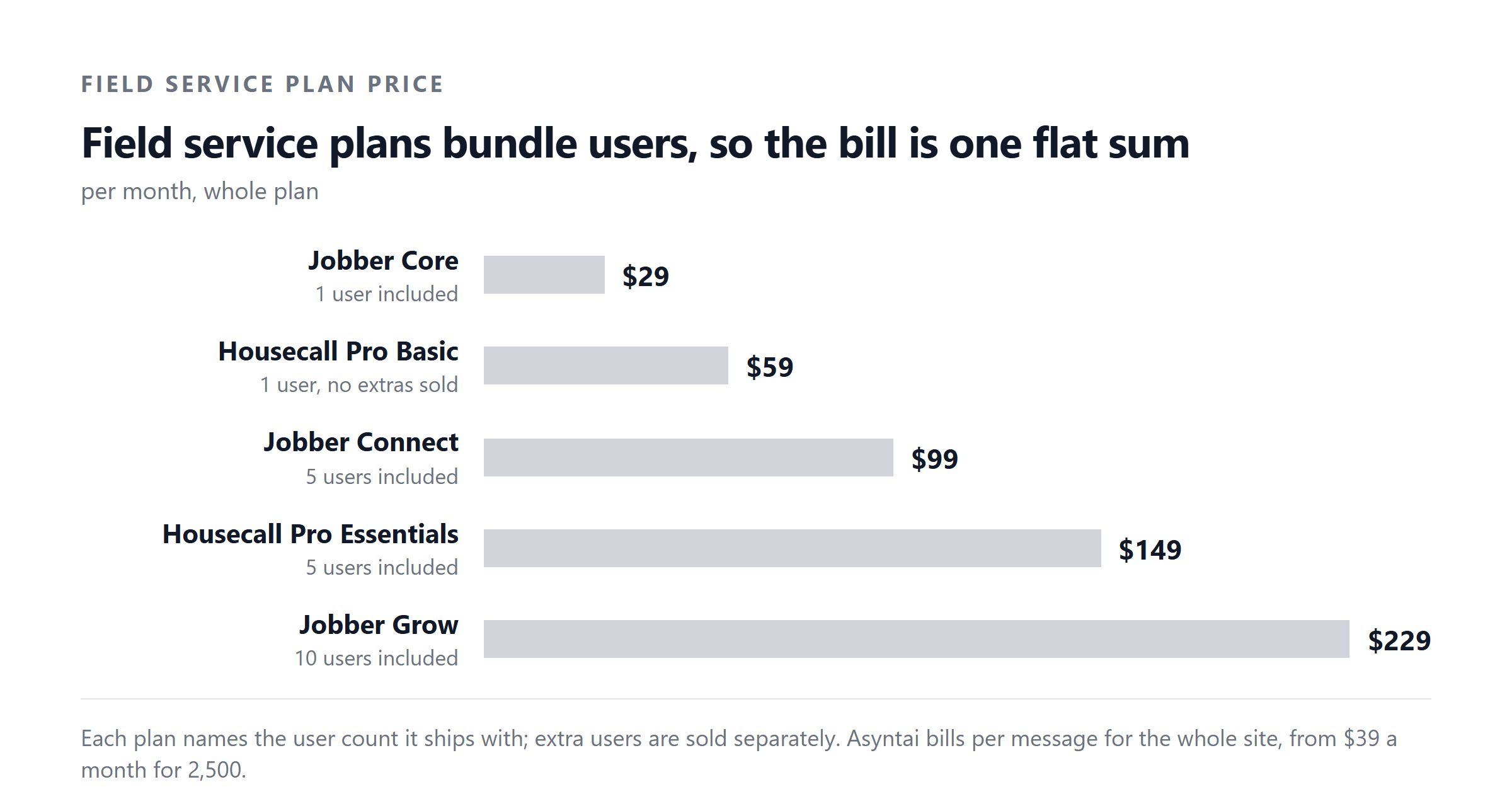
Jobber and Housecall Pro are the two names most cleaning companies meet first. Both price in USD per month for the whole plan, not per user, and both publish different numbers for monthly billing versus annual billing. The numbers below are the published rates for each billing term, in the same row as the user count they include.
| Plan | USD/month, annual | USD/month, monthly | Users included | Extra user |
|---|---|---|---|---|
| Jobber Core | $29 | $49 | 1 | $29/mo each |
| Jobber Connect | $99 | $139 | 5 | $29/mo each |
| Jobber Grow | $229 | $299 | 10 | $29/mo each |
| Jobber Plus | $399 | $499 | 15 | $29/mo each |
| Housecall Pro Basic | $59 | $79 | 1 | Not published |
| Housecall Pro Essentials | $149 | $189 | 5 | $100/mo each |
| Housecall Pro Max | $299 | $329 | 8 | $75/mo each |
| Asyntai Starter | $39 | $39 | Not per seat | Not per seat |
Jobber and Housecall Pro prices are from each vendor's own pricing page, checked September 2026. Asyntai is included for comparison; we make it, so read that row as a disclosure. Asyntai handles the inbound questions that arrive before anyone is called, which is the point of the later section.
Three things to notice in the table. First, every Jobber row has the same $29 per month per extra user, regardless of plan. Second, Housecall Pro publishes no extra-user price for Basic, so Basic is a single-user plan and any team bigger than one has to move up to Essentials. Third, Housecall Pro's extra-user charge is much higher than Jobber's: $75 to $100 a month each against Jobber's flat $29.
What the per-seat CRM tools publish
Zoho CRM, Pipedrive and HubSpot are general sales CRMs that price per user. They are built for sales pipelines, not cleaning routes, but they are popular with owner-operators who already use them for another business, or who started the cleaning company on the free Zoho tier.
| Plan | USD per user/month, annual | USD per user/month, monthly | Free seats | Notes |
|---|---|---|---|---|
| Zoho CRM Standard | $14 | $20 | 3 (free edition) | Local taxes on top |
| Zoho CRM Professional | $23 | $35 | Local taxes on top | |
| Zoho CRM Enterprise | $40 | $50 | Local taxes on top | |
| Zoho CRM Ultimate | $52 | $65 | Local taxes on top | |
| Pipedrive Lite | $14 | Annual only | ||
| Pipedrive Growth | $39 | Annual only | ||
| Pipedrive Premium | $59 | Annual only | ||
| Pipedrive Ultimate | $79 | Annual only | ||
| HubSpot Sales Hub Starter | $7 | $20 | 2 (free tools) | 500 credits |
| HubSpot Sales Hub Professional | $90 | $100 | 3,000 credits + $1,500 onboarding | |
| HubSpot Sales Hub Enterprise | $150 | 5,000 credits + $3,500 onboarding |
Per-seat prices are USD per user per month. Pipedrive publishes annual-only prices, so the monthly-billed column is blank for those rows. HubSpot Professional and Enterprise carry a required one-time onboarding fee on top of the per-seat price. Zoho CRM charges local taxes on top of the published figure, which is the reason the row notes it.
The Zoho free edition is the cheapest possible starting point for a solo cleaning operator and is genuinely useful for tracking customers. What it does not give you is a route planner, automated customer reminders, or a way for cleaners to see tomorrow's jobs on their phone. Those arrive in Jobber and Housecall Pro out of the box, and they are the features a cleaning company actually pays for.
Arithmetic for a five-person residential team
A common case is a residential cleaning company with one owner, one office coordinator, and three cleaners in the field. All five need to see the schedule; the owner and coordinator need to see the customer records; the cleaners need a mobile view of their day. The arithmetic below compares the cheapest published option that covers all five people on each tool, billed annually.
Two things to take from the working. First, Housecall Pro's Basic plan is not the right plan for a five-person team because Basic includes one user and Housecall Pro publishes no extra-user price for Basic, so there is no published way to add the other four people to it. Essentials at $149 a month is the smallest plan that covers five users on Housecall Pro.
Second, HubSpot looks cheap at the Starter tier ($7 a seat per month, billed annually), but Starter is a sales CRM, not a field service tool. The moment you need quoting, scheduling, or route optimisation you are pushed to Professional, and Professional carries a required one-time $1,500 onboarding fee on top of the per-seat price. That is the difference between $420 a year for five Starter seats and $6,900 a year for five Professional seats.
Arithmetic for a twelve-person commercial team
A commercial cleaning company with two supervisors and ten cleaners is twelve seats. This is the size where per-seat pricing starts to hurt, and where the Jobber tier ladder and the Housecall Pro tier ladder diverge in interesting ways.
The reason Housecall Pro gets expensive at twelve users is the extra-user rate: $75 a month each on Max. Four extras add $300 a month to the base $299, which doubles the bill. Jobber's extra-user rate is flat at $29 regardless of plan, so two extras add only $58 a month to the base $229.
If your commercial team grows past fifteen, you jump to Jobber Plus at $399 a month for fifteen users, and the same arithmetic starts again. Housecall Pro does not publish a tier above Max, so a team larger than Max plus its extras would have to negotiate separately, which is a different conversation.
Monthly billing versus annual billing
Every per-plan tool on the table publishes two prices: one for paying monthly, one for paying annually. The annual price is always lower, and the gap is the size of the discount for the commitment.
The annual commitment is not refundable in most cases, so it is worth paying the first three months on monthly billing to confirm the tool fits before switching to annual. Jobber, Housecall Pro, Pipedrive and HubSpot all publish 14-day trials for that reason.
The questions a website can answer before anyone is called
Half the inbound messages a cleaning company receives are answerable without a human. They are questions about price, areas served, availability, what is included in a deep clean, whether the company is insured, how payment works, and whether recurring customers get a discount. They arrive in the evening, at weekends, and during the day when the office coordinator is on the phone. Every one of those unanswered messages is a job that might go to the next company on Google.
A website chat agent answers these without putting a person on the rota. The list below is the specific enquiries for cleaning businesses that the Asyntai AI agent for small business is configured to handle.
- What is your price for a one-off clean, and what is included? Pull the published price list and the scope of work straight off your services page, so the customer sees the same number they would get if they read the page themselves.
- Do you serve my area, and what is the minimum booking? Use your service area page to confirm the postcode is in range and to set expectations on the minimum hours or minimum spend.
- Are you insured, and can you send proof? Hand back the insurance certificate page and the policy number, and route the rest to the office coordinator.
- What is your availability this week or next week? Quote the same lead times the website advertises, and route anything tighter than that to the office for confirmation rather than promising a slot the schedule cannot keep.
- Do you do regular cleans, and is there a discount? Pull the recurring plan structure and any frequency discount off the published pricing page.
- How does payment work, and when do you take payment? Hand back the published payment terms, including the deposit policy for first-time customers and the auto-pay policy for recurring work.
- Can I bring my own products, or do you supply them? State the published product policy rather than improvising, because this is a question where the office often answers differently from the website.
- What happens if I need to reschedule or cancel? Hand back the cancellation policy, including any notice period, and route any request to actually reschedule into the office inbox so it lands on the coordinator's list.
- Are your cleaners vetted, and do you do background checks? Hand back the vetting page and the DBS / equivalent disclosure policy, and route anything about a specific cleaner into the office.
- Do you do end-of-tenancy or commercial cleans, and what is different? Pull the relevant service page and pricing, and route any quote request straight to the office with the address and property details already captured.
What this list leaves out is the question a chat agent should not answer on its own: the actual quote for a specific property, anything that depends on the day's route, anything about a complaint or a refund, and anything about a specific cleaner's conduct. Those route straight to a named member of staff, which is the behaviour you configure rather than hope for.
If half of your inbox is the questions above, you can answer them on the website without adding another seat to whichever CRM or field service tool you pick. The team that would otherwise answer the phone picks up the messages that need a human.
What a CRM still has to do
A website chat agent is a different tool from a CRM. The chat agent handles the inbound questions before anyone is called. The CRM is the system of record for the customer once they have booked: their address, their access notes, their service plan, their visit history, their complaints, and their invoices. Those are different jobs and they need different tools.
The CRM does not have to be expensive. For a solo operator, the Zoho CRM free edition for three users is genuinely useful, and the $14 a month per user Standard tier is enough for a small team if the scheduling can be handled in a shared calendar or in Jobber's Core plan. For a team of five or more, the field service plans that include five users in the price start to make more sense than per-seat CRM pricing, because the scheduling is built in rather than assembled.
How the choice lands for different team sizes
For one or two people, the decision is between the Zoho CRM free edition and Jobber Core at $29 a month annual or $49 monthly. Zoho is cheaper and is a real CRM; Jobber Core is more expensive but includes the scheduling and mobile app for cleaners that Zoho does not. If you are doing the cleaning yourself, Zoho plus a shared calendar is enough. The moment you hire a second person who needs to see the schedule on a phone, Jobber Core earns its $29.
For three to five people, Jobber Connect at $99 a month annual includes five users, and that is the right tier for most small residential cleaning companies. Housecall Pro Essentials at $149 a month annual includes five users as well, and is the right tier on that tool, but the bill is $600 a year higher than Jobber for the same headcount.
For six to ten people, Jobber Connect stays the right tier as long as you stay under six users, and Jobber Grow at $229 a month annual becomes the next tier up once you cross six. Housecall Pro Max at $299 a month annual covers eight users, which is the right tier on that tool for a team of seven or eight, but the extra-user rate of $75 a month each makes it expensive for any team larger than eight.
For eleven to fifteen people, Jobber Grow at $229 a month annual plus $29 per extra user stays the cheapest field service option. Housecall Pro Max plus extras at $75 each gets expensive fast, and Jobber Plus at $399 a month annual for fifteen users becomes the cleanest answer once you cross thirteen or fourteen.
For sixteen or more, Jobber Plus at $399 a month annual plus $29 per extra user is the published field service tier. Beyond that you are in custom-pricing territory on most platforms, and the conversation shifts to enterprise contracts rather than published rates.
Free tiers and trials
Four of the five tools above have a free way in. Zoho CRM has a free edition for three users, which is enough for a solo operator. HubSpot has free Sales Hub tools for up to two users, which is enough to try the pipeline but not enough to schedule a cleaning team. Pipedrive has no free tier but has a 14-day trial. Jobber has a 14-day trial. Housecall Pro has a 14-day trial.
The free editions are not the same shape. Zoho's free CRM is genuinely usable for a small cleaning company on day one, with the limit being three users. HubSpot's free CRM is more limited and is positioned as a taste of the paid tiers. The trials are trials, and the data goes away at the end unless you convert.
What to check before you pay
Five things are worth confirming on a free trial or a paid month before you commit.
- Mobile app for cleaners. Open it on the same phone your team uses. If the schedule does not load fast, the cleaners will not use it.
- Route view for the day. Both Jobber and Housecall Pro publish this; both let you reorder jobs on the day. Try it on a real day with real traffic.
- Customer notification on arrival. Most customers want a 30-minute window text. Confirm the SMS cost is published and not a surprise.
- Recurring plan setup. Set up a weekly recurring customer and walk through the first four weeks of invoicing. Anything that needs a manual step each month is a hidden hour a week.
- Export your data. If you leave, can you take the customer list, the job history and the invoice history with you? This matters more than any feature in the demo.
What a website chat agent costs alongside
The chat agent on this site is priced in messages per month, not per user. The published self-serve tiers are Free for 50 messages, Starter at $39 a month for 800 messages, Standard at $139 a month for 15,000 messages, and Pro at $449 a month for 50,000 messages. Enterprise is a signed order form with a negotiated message allowance, and is not sold self-serve.
For a cleaning company that gets 20 to 60 website enquiries a week, the Starter tier at $39 a month is enough. The Standard tier at $139 a month covers a cleaning company with multiple landing pages or a regional network of branches, where each branch has its own contact form. The Pro tier at $449 a month is for a franchise or national operation where the volume justifies the spend.
Whatever tier you pick, the chat agent sits alongside whichever CRM or field service tool you run. It answers the questions that arrive before anyone is called, and the calls that need a human still go to the office coordinator or the owner.
A short summary of the published prices
| Tool | Meter | Cheapest published plan | Next step up | Free tier |
|---|---|---|---|---|
| Jobber | USD per plan per month | $29 / mo (Core, 1 user, annual) | $99 / mo (Connect, 5 users) | 14-day trial |
| Housecall Pro | USD per plan per month | $59 / mo (Basic, 1 user, annual) | $149 / mo (Essentials, 5 users) | 14-day trial |
| Zoho CRM | USD per user per month | $14 / user / mo (Standard, annual) | $23 / user / mo (Professional) | Free for 3 users |
| Pipedrive | USD per seat per month | $14 / seat / mo (Lite, annual) | $39 / seat / mo (Growth) | 14-day trial |
| HubSpot Sales Hub | USD per seat per month | $7 / seat / mo (Starter, annual) | $90 / seat / mo + $1,500 onboarding | Free tools for 2 users |
| Asyntai | USD per month, all users | $39 / mo (Starter, 800 messages) | $139 / mo (Standard, 15,000 messages) | Free for 50 messages |
Jobber, Housecall Pro, Zoho CRM, Pipedrive and HubSpot prices are from each vendor's own pricing page, checked September 2026. Asyntai is the chat agent on this site; we make it, so read that row as a disclosure. Asyntai handles the inbound questions on your website before anyone in the office picks up the phone.
The decision in one paragraph
Pick the tool whose bill shape matches your team. A solo operator or a two-person team can start on the Zoho CRM free edition and stay there. A team of three to ten people is best served by Jobber Connect or Jobber Grow, which include the right number of users in the published price and add $29 per month for each extra user. A team of eleven to fifteen is on Jobber Grow with extras, or Jobber Plus once you cross fifteen. Housecall Pro is more expensive than Jobber at the same headcount, because its extra-user rate is two to three times Jobber's. Pipedrive and HubSpot are sales CRMs, not field service tools, and the moment you need to schedule jobs on a phone they become the wrong shape. Whatever tool you pick, a website chat agent handles the inbound questions before anyone is called, and that is the part of the work that does not need a pipeline at all.
Sources
Jobber pricing from jobber.com, checked 4 September 2026.
Housecall Pro pricing from housecallpro.com, checked 4 September 2026.
Zoho CRM pricing from zoho.com, checked 4 September 2026.
Pipedrive pricing from pipedrive.com, checked 4 September 2026.
HubSpot Sales Hub pricing from hubspot.com, checked 4 September 2026.
Asyntai pricing from asyntai.com, checked 4 September 2026.