An AI chatbot in customer service is a retrieval layer over your own published content, sitting in front of a queue you still have to run. It reads the customer's question, pulls the most likely answer from the pages you point it at, and either replies or hands the conversation to a person. The interesting part is what happens at the boundary, because that is where every deployment is judged.
Four numbers tell you whether the thing is working: containment rate, handover rate, repeat-contact rate and time to first human reply. If you do not measure those, you are flying blind, and the cost of flying blind shows up in the failure path.
The phrase "AI chatbot" gets used as if it described one product. It describes a pattern, and the pattern has more moving parts than the chat window on your site suggests. A chat window is the surface. Behind it sits a retrieval step, a confidence step, a generation step, a guardrail step and a handover step. Each one can be done well or badly, and the difference is not visible from a screenshot.
What actually happens, end to end
When a customer types a question into the chat window, the system does not just send the message to a language model. A short pipeline runs first, and the order matters.
1. Retrieval. The chatbot takes the customer's message and searches the content you have pointed it at. That is normally your help centre articles, your FAQ pages, your shipping and returns page, your product specs, and any PDFs or knowledge base entries you have uploaded. The retrieval step returns a small set of passages, usually three to ten, ranked by how similar they look to the question.
This step is where most of the value comes from, and it is the part that has nothing to do with the language model. A chatbot with a great model and bad retrieval gives confidently wrong answers. A chatbot with a passable model and clean retrieval gives useful answers, because the model only has to phrase what your own pages already say.
2. Confidence threshold. The retrieved passages come back with similarity scores. The system compares the top score to a threshold you have set. If the top passage is a strong match, the chatbot answers. If it is borderline, the chatbot either asks a clarifying question or hands the conversation over. The threshold is the single most important knob in the whole system, and most teams never touch it.
Set it too high and the chatbot stops answering things it could have answered. Set it too low and it starts inventing. The right number depends on how embarrassing a wrong answer is in your context. A wrong answer about your returns policy is a support ticket. A wrong answer about a dosage is a lawsuit. The threshold is policy, not engineering.
3. Generation. If retrieval passed, the language model writes an answer using the retrieved passages as its source. A good system puts the passages into the prompt verbatim and tells the model to stick to them. A bad system lets the model "use its general knowledge" as well, which sounds helpful and is how you end up with the chatbot inventing a refund policy you do not have.
4. Guardrails. Before the answer reaches the customer, a separate check runs. This is normally a second classifier that asks, independently of the generation model, "is this safe to send?" It catches prompt injection, personally identifying information the customer has typed in, and answers that drift outside the retrieved passages. A single classifier that both writes and checks its own work is a known failure mode; the guardrail step is what makes the difference.
5. Handover or reply. If the answer passes, it goes to the customer. If anything earlier in the pipeline failed, or if the customer types "agent" or "human" or "this is not helping", the conversation is handed to your support team. The handover step carries the transcript, the retrieved passages the bot considered, and the reason it handed over. That last item is the one most platforms forget, and it is the one your agents need.
What the handover carries, and what the agent sees
A bad handover is a customer who has to repeat themselves. The agent gets the message, says "hi, how can I help?", and the customer says "I just told the bot, didn't it tell you?" That is a measurable interaction, and it is the one most likely to end with the customer leaving.
A good handover carries five things: the full transcript of what the customer and the bot said, what the customer was trying to do (the topic or intent), what the bot tried and what it retrieved, the reason for handover (low confidence, explicit request, escalation rule), and any context your CRM holds, like the customer's order number or subscription status if they were identified.
The agent should not have to scroll to find these. They should appear at the top of the conversation, with the transcript below. If your platform does not surface the reason for handover, your agents will default to treating every bot conversation as low-quality, because they cannot tell the difference between a bot that gave up and a bot that was right to give up.
This is also where the handover rate gets measured. A handover rate of 30% sounds bad until you learn that 20 percentage points of those handovers are customers who typed "agent" in the first message because they never wanted to talk to a bot in the first place. Without knowing the reason, the number is useless. With the reason, you can split the metric into "bot failed" and "customer chose human", and the two have very different fixes.
What the customer has to repeat
The honest answer is: whatever the system forgot. In the best case, nothing. The transcript is right there, the agent reads it, the conversation continues. In the worst case, everything: the agent has no context, asks the customer to start over, and the customer explains the same problem twice to two different people.
The middle case is the one to design against. The bot figured out the customer's intent but could not resolve it. The agent gets the transcript but no summary. The agent has to read three paragraphs of "I tried X and the bot suggested Y but that didn't work" before they know what is going on. That is a five-second overhead per handover, which sounds small and adds up to hours across a busy week.
A one-line summary at the top of the transcript ("Customer cannot reset password, tried the SMS code route twice, account locked since 14:03") collapses that overhead. The customer does not repeat themselves, the agent does not read a wall of text, and the conversation continues from where the bot stopped. Whether your platform produces that summary is a feature worth checking before you buy, not after.
What to measure
Four metrics cover almost everything you need to know about a customer service chatbot. None of them require a data team. All of them can be computed from the conversation log your chatbot already keeps.
Containment rate. The share of conversations the bot resolved without a human. Count a conversation as contained if it ended with the customer leaving without typing "agent" or being routed to the queue. A containment rate of 60% is normal for a well-tuned bot on a knowledge base that is up to date. A containment rate of 85% is suspicious; check whether the bot is answering things it should be handing over.
Handover rate. The inverse, more or less, but worth tracking on its own because the reason matters. Split it into "customer requested human" and "bot escalated". Customer-requested handovers are a product decision, not a failure. Bot-escalated handovers are a retrieval or threshold problem.
Repeat-contact rate. The share of customers who contact you again within seven days about the same issue. This is the metric that catches silent failures. A bot can contain a conversation, give a wrong answer, and never hand over, and containment rate will not notice. Repeat-contact rate will, because the customer comes back. Track it per topic if you can. A repeat-contact rate above 15% on a single topic is a red flag.
Time to first human reply. When a handover happens, how long does the customer wait? This is your operational metric, not the bot's, but the bot changes it. A bot that hands over too aggressively inflates the queue. A bot that hands over too late, because the queue is long and the bot kept trying, makes the customer wait longer for the same human answer. The right setting depends on your staffing.
The failure path in detail
Every chatbot deployment is judged by what happens when it fails, because failure is the common case at the edges. The interesting question is not "does it work on the easy questions". It is "what does the customer experience when the bot does not know the answer".
There are five common failure modes, and each one costs something specific.
The silent wrong answer. The bot retrieved a passage that looked relevant and was not, the confidence threshold let it through, and the customer got a confident reply that does not solve their problem. Cost: a repeat contact, possibly a churned customer, and the team does not know it happened unless they read transcripts. This is the failure mode that makes AI customer service look bad in the press. The fix is a tighter threshold and a separate output check.
The wall of text. The bot retrieved five passages, all of them partially relevant, and produced an answer that quotes pieces of each. The customer reads a paragraph that mentions three policies and does not know which one applies. Cost: the customer gives up and emails instead, which is a handover that did not count as one because the customer left of their own accord. The fix is generation, not retrieval: the bot should pick the single best passage and answer from it.
The endless clarifying loop. The bot's top retrieval score is below threshold, so it asks a clarifying question. The customer answers. The bot retrieves again, gets a similarly middling score, asks another clarifying question. The customer is now three messages in and has not been forwarded to a human. Cost: the customer types "agent" in frustration, or leaves. The fix is a rule that says "after two clarifying turns without a confident answer, hand over".
The category mismatch. The customer's question is about a topic your knowledge base does not cover. The bot retrieves the closest thing it can find and answers as if that were the topic. The customer reads an answer about shipping policy when they asked about a damaged product. Cost: same as the silent wrong answer, plus the customer's complaint arrives in the wrong queue. The fix is an "out of scope" classifier that triggers a handover before the bot answers.
The handover with no context. The bot escalates correctly, but the handover message is empty, the transcript is buried, or the agent UI does not show what the bot tried. The agent asks the customer to repeat themselves. Cost: the customer feels passed around, the average handle time goes up, and containment rate for the next conversation drops because the customer has learned to bypass the bot. The fix is a product decision about what the handover carries.
Why the published content matters more than the model
The most common reason a customer service chatbot fails is not the language model. It is the content the bot is reading. If your help centre has 40 articles, six of which were written in 2021 and have not been updated since your last price change, the bot will answer from the old articles with the same confidence it answers from the new ones. It has no way to know they are stale, which is why a knowledge base built for AI answers matters from day one.The fix is content work, not model work. Audit your help centre the same way you would audit a piece of documentation you were about to hand to a new hire. Anything that is wrong, outdated or contradictory gets rewritten or removed. Anything that is duplicated gets merged. Anything that is missing, the bot cannot invent.
This is also why the retrieval step is more important than the generation step. A bot that retrieves well and writes poorly is more useful than a bot that writes beautifully and retrieves poorly. The first gives you a clunky version of the right answer. The second gives you a polished version of the wrong one.
A worked example on Asyntai's own published message allowances
Asyntai charges by message, not by seat. The published tiers, from the public pricing page, are:
- Free: 50 messages per month, no charge.
- Starter: $39 per month for 800 messages.
- Standard: $139 per month for 15,000 messages.
- Pro: $449 per month for 50,000 messages.
- Enterprise: a signed order form with a negotiated allowance.
The interesting question is how those numbers translate into what the bot actually does. A "message" in this context is one turn from the customer or one turn from the bot, so a single conversation is several messages. A typical back-and-forth that the bot resolves is four to eight messages. A conversation that ends in a handover is usually three to five messages before the customer types "agent", plus whatever happens on the human side.
Work the numbers for a small site with 2,000 customer conversations a month, of which the bot resolves half. The other half, the customer gives up on the bot, types "agent", or the bot escalates because the question was out of scope.
That puts the site on the Standard plan at $139 a month, with room to spare inside the 15,000-message allowance. The leftover allowance is worth thinking about: it is the headroom for a bad week, not waste. If a product recall sends a thousand extra customers to the chat in a single day, the same tier absorbs it.
Now work it for a busy site at 10,000 conversations a month, with the same 50/50 split and the same message counts.
That sits exactly on the Pro tier at $449 a month. The interesting thing about that figure is what it is not: it is not $449 per agent, because there is no agent on the platform in the usual sense. It is not per seat. It is the cost of a month of automated answers plus a month of handovers into a human queue that the customer is still paying for elsewhere. The model and the meter are different, and the difference matters when you compare totals.
The Enterprise tier exists for the cases above 50,000 messages, and the allowance is negotiated. If your site is at 100,000 conversations a month, the conversation about price is a contract conversation, not a pricing-page one.
What changes the answer
Four things move the cost and the quality of an AI customer service chatbot, and they are not the things the marketing pages lead with.
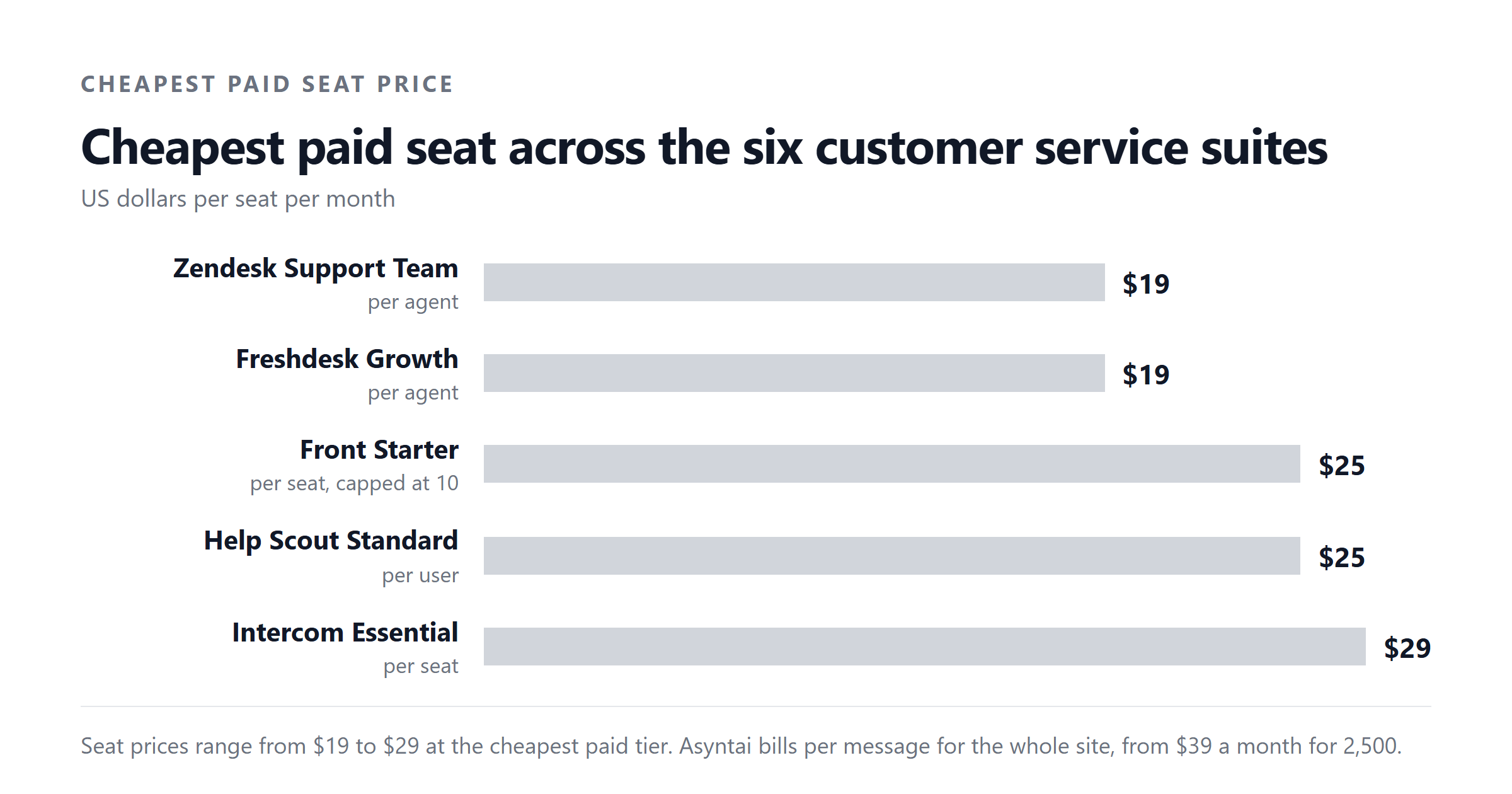
Volume. Per-message pricing scales linearly with traffic. Per-seat pricing does not, until you add agents. If your traffic is steady and your team is small, per-message is cheaper. If your traffic is spiky and your team is large, per-seat may be cheaper. The breakeven depends on your numbers, not on the marketing comparison.
Team size. Per-seat pricing punishes you for staffing. Per-message pricing punishes you for traffic. Most customer service operations are staffed for peak traffic, which means the team is overpaid for the median day. A per-message model converts that overpayment into a smaller line item, at the cost of giving up the seat-based features some platforms bundle in.
Knowledge base quality. A good chatbot on a bad knowledge base gives wrong answers. A bad chatbot on a good knowledge base gives clumsy answers. If your knowledge base is in good shape, the choice of chatbot matters less than people think. If it is in poor shape, no chatbot will save you.
Opening hours. A bot that runs 24 hours a day changes the economics of out-of-hours support. If your team works 9 to 5 and 40% of your traffic is outside those hours, the bot is doing work you would otherwise have to staff or accept as lost. That is the strongest single argument for AI customer service, and the one most often missing from the comparison articles.
The mistake most people make
The mistake most people make is measuring success by containment rate alone. A high containment rate looks good in a dashboard. It does not tell you whether the bot gave the right answer, whether the customer would have contacted you again, or whether the agent on the other end of the handover is now handling a queue full of bot-failed conversations.
A chatbot that contains 80% of conversations and gives wrong answers to 15% of those is worse than a chatbot that contains 50% and gives correct answers. The first number is the one your boss will see. The second is the one your customers will feel.
The way to avoid the mistake is to track repeat-contact rate alongside containment rate, and to read transcripts. Not all of them, but a random sample of 50 a week, with a focus on the conversations that ended without a handover. Read them the way you would read a customer email: did this person get what they needed, or did they get a confident-sounding reply that misses the point?
That habit, more than any technical choice, is what separates a chatbot deployment that works from one that looks like it works.
Asyntai handles customer service chat on your site, trained on your published pages, with handovers to your team that carry the transcript and the reason for escalation. The pricing is by message, the four published tiers run from free to $449 a month, and the enterprise tier is a negotiated contract for higher volumes. See the current pricing or talk to us about a custom allowance.
Sources. Asyntai plan names, message allowances and prices from the Asyntai pricing page, checked September 2026. Intercom seat prices and Fin AI per-resolved-outcome price from Intercom's own pricing page, checked September 2026. The per-conversation message counts used in the worked example (six messages for a bot-resolved conversation, four for a handed-over conversation) are illustrative assumptions, not vendor figures.