A website widget is a small piece of third-party JavaScript that renders a feature on your page after the rest of it has loaded, and the bill nobody shows you is what it costs the visitor's browser to fetch, parse and execute it.
Three numbers decide whether that bill is tolerable: how many requests the snippet makes, how many bytes it transfers before anything useful appears, and how much of the main thread it occupies during the window where your largest content should be painting.
The term covers a wide range of things. A chat launcher, a cookie banner, a reviews carousel, a booking form, an exit-intent popup, a heatmap recorder, a translation switcher. They look different in the corner of the page but underneath they are the same shape: a <script> tag you paste into your template, a remote file it loads, a remote file that loads more remote files, and a small piece of DOM that appears once all of that is ready.
What follows is the mechanism, the measurements, the arithmetic, and the worked example, written for someone who needs to understand what their site is doing rather than pick between vendors.
What the snippet actually does on first paint
When a visitor opens your page, the browser starts to download the HTML and to build the DOM. A widget snippet is usually one of two shapes. The modern shape is an asynchronous tag with a deferred callback:
<script>
  (function(w, d, s, o, f, js, fjs){
    w[o] = w[o] || function(){ (w[o].q = w[o].q || []).push(arguments) };
    js = d.createElement(s); fjs = d.getElementsByTagName(s)[0];
    js.async = 1; js.src = f; fjs.parentNode.insertBefore(js, fjs);
  })(window, document, 'script', 'widgetQueue', 'WIDGET_VENDOR_HOST/widget.js');
</script>
<div id="widget-root"></div>
<script> widgetQueue('init', { account: 'abc123' }); </script>
The interesting bits are js.async = 1 and the parentNode.insertBefore call. Asynchronous script loading tells the parser it does not have to block on this file. The script still executes, but the browser keeps parsing the rest of the HTML while the file is in flight. This is the difference between a tag that adds maybe a hundred milliseconds to first paint and one that adds several seconds.
The older shape, which still appears in older widgets, is a synchronous document.write call:
<script src="WIDGET_VENDOR_HOST/widget.js" type="text/javascript"></script>
This one blocks the parser. The browser hits the tag, downloads the file, executes it, and only then continues down the HTML. If the vendor's server is slow, your visitor is staring at a half-rendered page. If you ever see a widget tag that looks like a single line of HTML with a synchronous src, that is the one worth replacing first.
How many requests does it make
One script tag does not equal one request. The widget script itself is one request, but the moment it runs it usually pulls in several more: a CSS file for the launcher styling, a webfont for the chat icon, a configuration JSON, an icon sprite, a tracking pixel, sometimes a separate script for the visitor-side analytics. A typical chat widget can account for six to twelve additional requests on top of your own page assets.
Each request is a TCP connection, a TLS handshake if it is HTTPS, a DNS lookup if the host is different, and a small amount of queueing on the main thread while the response is parsed. Twelve requests across four different domains is not unusual, and that is a chat launcher before it has sent a single message.
The number to look at, in your browser's network panel, is not the count for the widget itself but the count for "third-party requests" as a whole. A page that loads cleanly without any widget will show roughly zero third-party requests. A page with one chat widget, one analytics tag, one cookie banner and one reviews widget will show twenty or more.
Why it is loaded after window.load
Most chat and popup widgets are written to wait until the load event before they insert themselves into the DOM. The reason is straightforward politeness. The browser fires load when every resource on the page has finished downloading. Inserting your launcher after that point means it cannot delay the moment the visitor sees the page they actually came for.
The downside is that "after load" is when the browser has finished its most expensive work, and your widget will compete with the rest of the page for the user's attention. If the widget then loads another 80 KB of JavaScript and executes it on the main thread, the visitor's scroll feels sticky, taps feel laggy, and the page fails the Interaction to Next Paint test even though it passed Largest Contentful Paint at the start of the visit.
You can see this in a Lighthouse run as a category called "Third-party usage". The audits in that category list every third-party domain, the transfer size it contributes, the blocking time it adds, and the main-thread time it occupies. For a typical small business site with one chat widget and one analytics script, the third-party main-thread blocking time is often the single largest contributor to a poor Total Blocking Time score.
What a cookie banner does to it
A cookie consent banner is itself a widget, and it has a particular effect on every other widget. Most consent tools work in one of two modes. In the strict mode, the consent script loads first, blocks every other third-party tag until the visitor accepts or declines, and only then injects them. In the lenient mode, every tag loads immediately, and the consent tool suppresses whatever functionality would set a cookie.
The strict mode is the kinder to your Lighthouse score, but it has a visible cost. Until the visitor clicks Accept, your chat widget is not on the page at all. The launcher you carefully positioned in the bottom right corner is missing for the first few seconds of the visit, which is exactly when most visitors decide whether they have a question or leave.
The lenient mode keeps the launcher visible but has its own arithmetic. The consent script, the policy loader, the analytics suppression wrapper, and the consent banner itself are all extra requests and extra bytes. A consent tool alone can add four to eight requests and 60 to 100 KB before any other widget is allowed to do anything.
If you want the chat launcher visible without making the page feel slow, the configuration that works is: defer the chat widget's outbound network calls until the visitor interacts with the launcher, ship the launcher markup inline rather than fetched, and let the chat vendor's own script stay in defer mode until after consent. The arithmetic on this is shown below.
How to measure the cost on your own site
Three measurements matter, and you can take all three on a live page in under ten minutes.
- Lighthouse on a mobile profile, before and after. Open Chrome, open DevTools, switch to the Lighthouse tab, choose Mobile, Performance only, and click Analyze. Save the JSON. Now comment out your widget tags, repeat the run, and compare. The delta on Total Blocking Time and on the Largest Contentful Paint score is your widget's contribution to load cost.
- The Web Vitals overlay, in the field. Install the Web Vitals Chrome extension, then visit your site in a clean profile. LCP, INP and CLS are surfaced for the visit. Open a second tab and load the same page with the widgets blocked at the network layer using uBlock's "Block element" mode. The difference between the two is the realistic worst-case improvement you can expect.
- The third-party summary in the Network panel. Open DevTools, switch to the Network tab, sort by domain, look at the rows whose domain is not your own. Count the domains. Add up the transfer size. Anything outside your first-party origin is third-party, and Lighthouse classifies anything past 200 KB of third-party transfer as a warning.
The two specific Web Vitals to watch are Largest Contentful Paint and Interaction to Next Paint. LCP is what the visitor sees first. INP is what the visitor feels when they try to scroll or tap. A widget that loads after window.load will rarely hurt LCP, but it can absolutely tank INP because its main-thread work happens during the window when the visitor is already trying to use the page.
Third-party domains are the count Lighthouse uses for its "Reduce the impact of third-party code" audit. Anything past four distinct third-party domains on a marketing page is a yellow flag. Anything past eight is a red flag. The arithmetic behind this rule is the connection-cost overhead: each new domain is another DNS lookup, another TCP handshake, another TLS negotiation.
The transferred bytes
Transferred bytes is the number to read off the Network panel's "Size" column, summed across every response that is not a same-origin response. A first-party marketing page without any widgets usually transfers 300 to 800 KB. The same page with a chat widget, an analytics tag and a cookie banner will transfer 1.2 to 2.0 MB. That is the real cost of a widget, in network terms.
The components are predictable. The launcher script is usually 30 to 80 KB compressed. The styling is 5 to 15 KB. The webfont for the icon is 20 to 60 KB even though you use one glyph. The configuration JSON is small, often under 5 KB, but the act of fetching it is a separate request. Then there is the chat history payload on subsequent visits, which can be 50 to 200 KB if the vendor caches conversation state in the browser.
Most teams underestimate this number because they read the script tag's file size and ignore the rest. The launcher is rarely more than a fifth of the total transfer.
The worked example
Because the page is about the mechanism, the price ladder that goes with it belongs to the thing the reader is likely to evaluate, which is a chat widget specifically. Asyntai publishes four self-serve tiers with a clear meter:
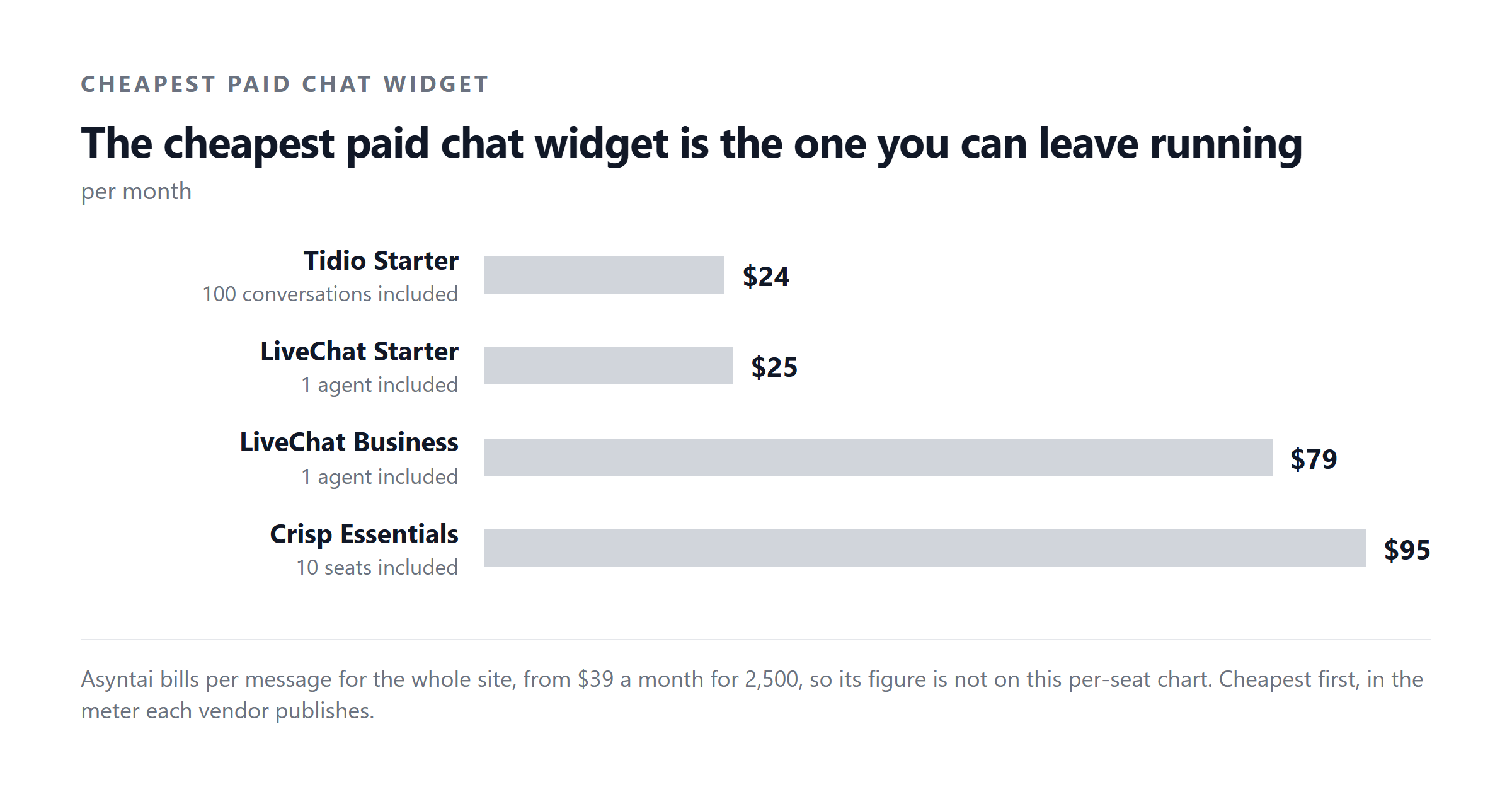
The meter is messages, not agents. That matters because the alternative meter, used by per-seat products, is per-seat, and the two produce very different bills at the same volume. A per-agent product with three published tiers charges $19, $49 or $79 per agent per month on annual billing, and $25, $59 or $89 per agent per month if billed monthly, with those figures checked on 2026-09-04. A team of three agents on the middle annual tier pays $147 a month for unlimited conversations; the same three agents handling roughly 15,000 messages a month on Asyntai Standard would pay $139.
The point of quoting both here is not to recommend one meter over the other. The point is that the two meters behave differently as volume rises, and the worked example makes the difference visible:
Now lift the volume. A site with 20,000 chats a month is still a three-agent team if the widget answers most of them, and the per-agent bill stays roughly where it is. The per-message bill climbs:
Notice the trade-off. Per-agent pricing is cheaper at the high-volume end if your human team is already answering everything. Per-message pricing is cheaper at the low-volume end and at the long tail where a chatbot answers the common questions. The widget's mechanism is the variable, because a chat widget that resolves half the tickets in software does not need three agents at 20,000 messages, it needs one.
What changes the answer
Four variables decide which meter is right for a particular site, and each one can be measured before you commit.
Volume is the first. Count your contact form submissions, your email tickets and your live chat conversations for the last 90 days, average them, and double the busiest week. That is the number to budget against.
Resolution rate is the second. Of the tickets you received last quarter, how many were answered by the first reply from your team, and how many were the same handful of questions (where is my order, what time do you close, how do I reset my password). A widget that resolves 40% of tickets in software means a 100-ticket-a-day site only needs two agents instead of four, and the meter that scales with messages is the cheaper one at that resolution rate.
Opening hours is the third. If your team answers 9 to 5 and your visitors come from three time zones, the chat window outside your hours is wasted budget. A widget that answers in software during those hours captures the revenue a per-agent plan pays for and a per-message plan does not.
Page weight is the fourth, and it is the one most buyers ignore. A widget that loads 800 KB of third-party JavaScript on a marketing page will cost you visitors before it has answered a single question. If your homepage currently transfers 1.5 MB of first-party assets, a 200 KB widget is one-seventh of the total, and Lighthouse will flag it. If your homepage currently transfers 300 KB, the same widget is now two-fifths.
The mistake most people make
The mistake is to evaluate a widget by its monthly price and not by its effect on the page that hosts it. A $39 plan that adds a second to your Largest Contentful Paint is more expensive than a $139 plan that adds nothing, because the first plan costs you visitors before the chat has a chance to engage.
The arithmetic on this is unglamorous and worth doing. If your site converts at 2% and you have 10,000 unique visitors a month, you currently have 200 conversions. A one-second LCP regression on mobile typically costs between 7% and 12% of conversions on a content-led site, which on this site is 14 to 24 lost conversions a month. If your average order is $80, that is $1,120 to $1,920 a month of revenue the widget has to earn back.
The other mistake is to add the widget before measuring the page. The Lighthouse run takes three minutes. The Web Vitals overlay takes a browser extension and a visit. The third-party summary takes a sorted Network tab. None of these require a budget or a vendor relationship. Run them first, add the widget second, and compare.
A short installation checklist
If you have decided to add a chat widget, the order of operations below is the one that minimises the cost you have just read about:
- Take the Lighthouse baseline. Mobile, Performance only, save the JSON. Note LCP, TBT, and the third-party summary block.
- Install the snippet with
asyncordefer. Synchronous tags are the easiest win and the rarest to find in modern widgets. - Place the snippet just before
</body>. Above the closing body tag means the parser reaches it last, which is what you want for a feature that is not part of the page's content. - Configure your consent tool to defer non-essential tags. The chat launcher markup is fine to load early. The chat script's outbound calls should wait for consent.
- Take the Lighthouse measurement again. Compare the third-party transfer size and the Total Blocking Time. If TBT has moved by more than 50 ms, the widget's main-thread work is too heavy and you need a different vendor or a stripped-down embed.
- Re-measure after a week of real traffic. The first measurement is a clean cache. Real visitors have warm caches but also have other tabs open and slower phones. The field INP from the Web Vitals overlay is closer to what they actually feel.
Two points that often surprise people at this stage. The first is that removing a chat widget does not usually restore the original Lighthouse score, because the consent banner stays. The second is that the cheapest widget on the page is rarely the chat launcher; it is the analytics tag that loads three different vendor domains.
When the widget is the right answer
A chat widget is the right answer when the common questions on your site have written answers, your visitors arrive outside your team's hours, and your team is small enough that the per-seat bill is the binding constraint. It is the wrong answer when your visitors mostly need a phone number, when your team already answers fast enough, or when your page is already heavy enough that another 200 KB is the straw.
The mechanism you have read about above is the same regardless of which widget you choose. The snippet is the same shape. The requests are the same shape. The window.load deferral is the same. The measurement is the same. What changes between vendors is the price ladder, the resolution rate of the bot underneath it, and the byte cost of the launcher. Those are the three things to compare, in that order.
If you would like to see the meter behave at your real volume before you commit, Asyntai's Free Plan ships 50 messages a month at no charge, and the Starter Plan covers 800 messages at $39 if you want a fuller trial. Install the snippet, run Lighthouse before and after, and the numbers will tell you whether the widget is worth the bytes.
Sources and dates
- Asyntai published plans, asyntai.com pricing page, checked 2026-09-04.
- Per-agent published tiers, the vendor's own pricing page, checked 2026-09-04. Annual billing $19/$49/$79 per agent per month for the three published tiers. Monthly billing $25/$59/$89 per agent per month for the same three tiers.
- Lighthouse documentation on third-party usage, INP and Total Blocking Time, as published in the Chrome DevTools documentation, current as of 2026.
- The three Web Vitals named here, LCP, INP and CLS, are Google's own field metrics. Read the current thresholds in your own PageSpeed Insights report rather than from this page, because they are revised.