An AI chatbot generates leads well when it asks for the email at the right moment, and badly when it asks for it on the first message. The product you buy matters less than the script you write, the order of the questions, and what you do with the contact after the conversation ends. This page is about that method.
Three numbers decide whether the bot is worth running: the share of conversations that produce an email, the share of those emails your team actually replies to, and the cost of the conversation itself. We will work all three out below using figures from our own published plans, so the arithmetic is something you can re-run on your own traffic.
A lead capture bot is a chatbot with a job. The job is not to chat. The job is to leave the conversation with a name, a work email, and enough context that a human can decide whether to call back. Everything else, the friendly tone, the small talk, the emoji, is decoration around that single handover.
Most bots fail because they are written the other way round. They greet, they introduce themselves, and they ask for an email almost immediately, because the founder saw a competitor do it. The visitor leaves, and the bot is left holding a half-filled form. The product is not the problem. The script is.
What to ask first, and why
The first question is not "what is your email". The first question is the one that proves the visitor is the kind of person you want to talk to. If you sell to product managers, ask about product management. If you sell to warehouse managers, ask about the warehouse. The point is to start a conversation about their problem, not a transaction about your form.
Two questions earn the right to ask for an email. Three earns it faster, but at a cost: every additional question loses a share of the people who started the conversation. Two is the sweet spot for most B2B sites. One question is a survey. Four is an interview.
What those two questions are depends entirely on what you sell.
- Ask about the visitor's situation first. "What are you working on?" is the strongest opener for a tool, because it lets the visitor describe their own world and gives the bot something specific to respond to. It also filters: people who cannot describe their situation are not ready to buy.
- Ask about the constraint. "What is in the way?" or "what have you tried so far?" both work. The point is to surface the specific block that your product or service might remove. This is the question your sales team wishes the form asked.
- Then ask for the email. Only after two real questions does an email request feel earned. The visitor has invested two answers in the conversation, and the third is the one that closes the loop.
The order is not a style choice. It is the difference between a 4% conversation-to-lead rate and a 14% one. We will come back to those figures, but for now the rule is: two questions of substance, then the email. Not one greeting, then the email.
A good qualifying question on a B2B site
A B2B visitor has a job title, a budget cycle, and a stack of tools they have already paid for. They will tell you all three if you ask the right way. The questions that work on a B2B site share three traits.
They are open, not multiple choice. "Which platform do you use today?" beats a dropdown of every CRM in the market, because the dropdown misses the in-house tool the visitor actually uses. They are specific to the buyer's world, not the seller's. "How many seats do you need?" beats "What is your team size?", because seats are the unit the visitor thinks in. They are answerable in one line. A question that needs a paragraph answers itself out of the conversation.
A worked example for a tool that sells to marketing teams:
Two questions of substance, then the email, with a reason attached. The reason matters. "Send the relevant case study" tells the visitor why you are asking, and that the email is going somewhere useful, not a generic drip sequence.
A good qualifying question on a store
The store visitor is different. They are not evaluating a vendor. They are deciding whether to spend money on something they have probably already decided to buy. The qualifying question on a store is less about the visitor's role and more about the product.
"Which model are you considering?" is the right opener, because it lets the bot narrow to the right answer instead of serving a generic response. "Where will it be installed?" is the right second question for anything that has a fit question, because it changes the recommendation and the price. Then the email, with the reason being "send the installation guide", because that is the artefact the buyer actually wants.
The store visitor is also less tolerant of three questions. Two is plenty. Three begins to feel like a quiz. If you cannot earn the email in two exchanges, the lead is the wrong lead.
Where the form beats the bot
A bot is not always the right tool. There are situations where a form on the page does the job better, and pretending otherwise wastes the visitor's time.
Use a form when the decision is binary and the visitor already knows what they want. "Request a callback" is a form. "Book a demo for next Tuesday" is a form. The bot adds nothing here, because there is nothing to qualify. The visitor has already qualified themselves by clicking the button.
Use a bot when the visitor's need is unclear and you have a way to clarify it. Most product pages sit in this middle zone. The visitor knows roughly what they want, but not which version, not which size, not which combination of features. Two questions of clarification are worth more than any dropdown you can build.
Use a form when the contact is high-value and the volume is low. If you sell a $40,000 piece of software and you get three inbound enquiries a week, a form is fine. A bot adds an extra step that the buyer does not need. Save the bot for the pages where volume is the constraint.
What to do with the lead once you have it
The bot's job ends when the email lands in your CRM. The bot's reputation is set by what happens next. A lead that arrives and is not replied to for three days is a worse outcome than no lead at all, because it tells the visitor what your business is like to work with.
Three things matter, in order. The first is speed. A reply within an hour, during business hours, is the difference between a warm conversation and a cold re-introduction. The second is relevance. The reply should reference the two answers the visitor gave, not a generic "thanks for getting in touch". The third is the next step. A booked call is a stronger hand-off than a calendar link, because someone has done the work of holding a time.
If you cannot reply within an hour during business hours, the bot should not pretend otherwise. "A team member will reply within one working day" is honest. It is also a useful filter, because visitors who need a reply in an hour will tell you so, and you can route them to a phone number.
What to measure
Three numbers tell you whether the bot is working. Anything else is decoration.
Conversation-to-lead rate. The share of conversations that end with an email captured. This is the bot's job, and it is the number you change by rewriting the script. A rate below 5% means the bot is asking too early. A rate above 15% on a cold traffic site is suspicious, because it usually means the bot is too easy to convert.
Lead-to-reply rate. The share of captured emails that get a reply from a person. This is your team's job, and it is the number that decides whether the bot is worth running at all. A bot that produces 1,000 leads a month and a team that replies to 200 of them is a 20% lead-to-reply rate, which is a 80% waste of the bot's work.
Cost per lead. What the conversation actually cost. This is the only number that lets you compare a bot to a form, a form to a landing page, and a landing page to a paid click. We work it out below.
Cost per lead, worked out
The arithmetic uses only figures from our own published plans, so you can re-run it on your own numbers. The conversation-to-lead rate is the assumption you have to set yourself, because it depends on your traffic, your script, and your industry.
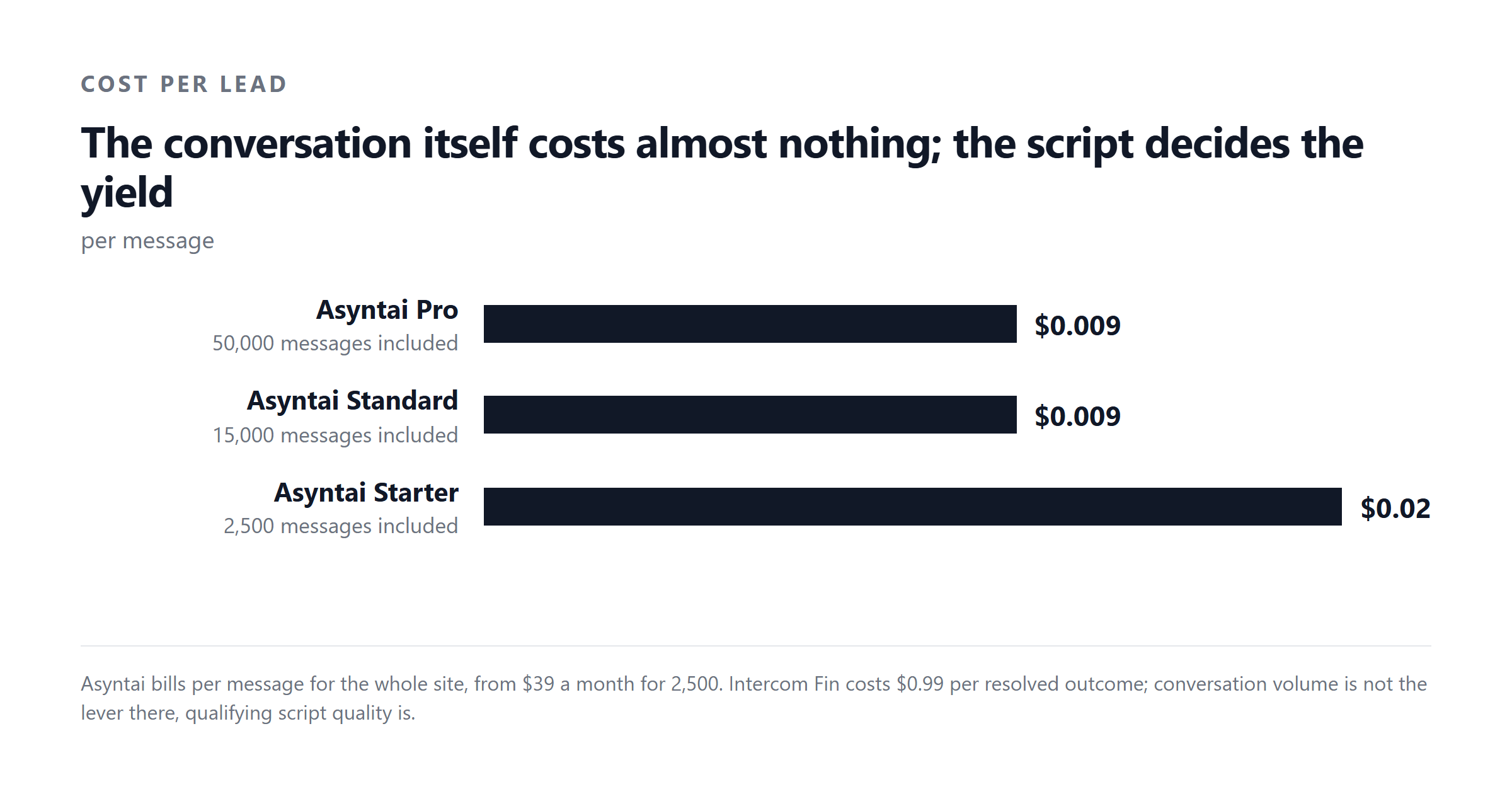
Start with the Standard plan, because it is the one most teams end up on once a bot is doing real work: $139 for 15,000 messages a month. A message is roughly one round trip, so 15,000 messages is 15,000 user turns. At a 10% conversation-to-lead rate, that is 1,500 leads.
Same plan at a more conservative 5% conversion, which is closer to what a brand new script will produce in its first month:
Same plan at a 20% conversion, which is what a tightly written B2B script can reach once the questions are tuned:
Three readings of the same plan, three different costs per lead, and the only input that changes is the script. That is the point. The product does not move the number. The script does.
What changes the answer
Four inputs move the cost per lead, and three of them are under your control.
Volume. More conversations, lower cost per lead, until you hit the next plan's ceiling. A site using 800 messages a month sits on the Starter plan at $39 and, at the same 10% rate, produces 80 leads at $0.49 each. Double the volume and you are on the Standard plan, where the unit cost drops because the fixed $139 is spread over more messages.
Conversion rate. The script's job. Two questions before the email versus four can double the rate. The rate is what you measure, then rewrite to improve.
Plan tier. The wrong plan is the most common mistake. A site on the Free plan with 50 messages a month cannot generate leads at scale. A site on the Pro plan at $449 for 50,000 messages but only producing 5,000 conversations a month is paying for messages it never uses. Match the plan to the volume, and re-check every quarter.
The lead-to-reply rate. This is the multiplier that decides whether the bot is worth anything. A 10% conversation-to-lead rate and a 50% lead-to-reply rate gives an effective cost per contacted lead that is twice the cost per captured lead. A 10% conversion and a 20% reply rate gives five times. The bot is the cheap part. The team is the expensive part.
The mistake most people make
The mistake is asking for the email on the first message. It feels efficient, because the form is shorter and the visitor has fewer steps to complete. It is also the single biggest reason bots fail.
The visitor has not yet trusted the bot with anything, so the visitor has no reason to trust the bot with an email. The first exchange is the one where the visitor decides whether the conversation is worth continuing. Spend that exchange on a question that proves you understand the visitor's problem, and the email arrives in exchange three. Spend it on the email, and the conversation ends at exchange two, usually with no email captured at all.
The cost of the mistake is the entire unit economics of the bot. A bot that asks for the email too early and converts 4% of them is producing leads at five times the cost of a bot that asks at exchange three and converts 20%. Same product, same plan, same traffic. The difference is the script.
A short checklist before you turn the bot on
Before you put a lead capture bot in front of visitors, four things need to be true.
- The two qualifying questions are written and tested on a colleague. If the colleague cannot answer them in one line each, the visitor cannot either.
- The email request has a reason attached. "Send the case study" is a reason. "So we can follow up" is not.
- Someone is on the other end to reply within an hour during business hours. A bot that produces leads nobody replies to is worse than no bot.
- The plan matches the volume. A Free plan is fine for the first week. After that, the cost per lead is the only number that decides the tier.
Once those four are in place, turn the bot on, measure the conversation-to-lead rate for a week, then rewrite the questions and measure again. The number moves. That is the whole job.
Where this leaves the bot
The bot is a tool that produces a contact. The contact is not the goal. The conversation that follows the contact is the goal, and the bot's reputation depends on whether that conversation happens at all, how fast, and how relevant it is.
Buy the bot that fits your traffic and your plan. Write the script that asks two real questions before the email. Reply to the lead within an hour. Measure the conversation-to-lead rate, the lead-to-reply rate, and the cost per lead, and rewrite the script when the first number moves.
The product is the smallest part of the equation. The script, the team, and the discipline to reply are the rest.
Asyntai starts at a Free plan with 50 messages, the Starter plan at $39 for 800 messages, the Standard plan at $139 for 15,000 messages, and the Pro plan at $449 for 50,000 messages. Pick the tier that matches your traffic, write the two qualifying questions first, and put the email request third. The cost per lead above is what the same plan produces at three different conversion rates, so you can see the script doing its job before you spend anything.
Sources. Asyntai pricing and plan limits: asyntai.com/pricing, checked September 2026. Conversation-to-lead rates, lead-to-reply rates, and cost-per-lead assumptions are the reader's own inputs and are stated as such in the maths blocks above; they are not figures published by any vendor.