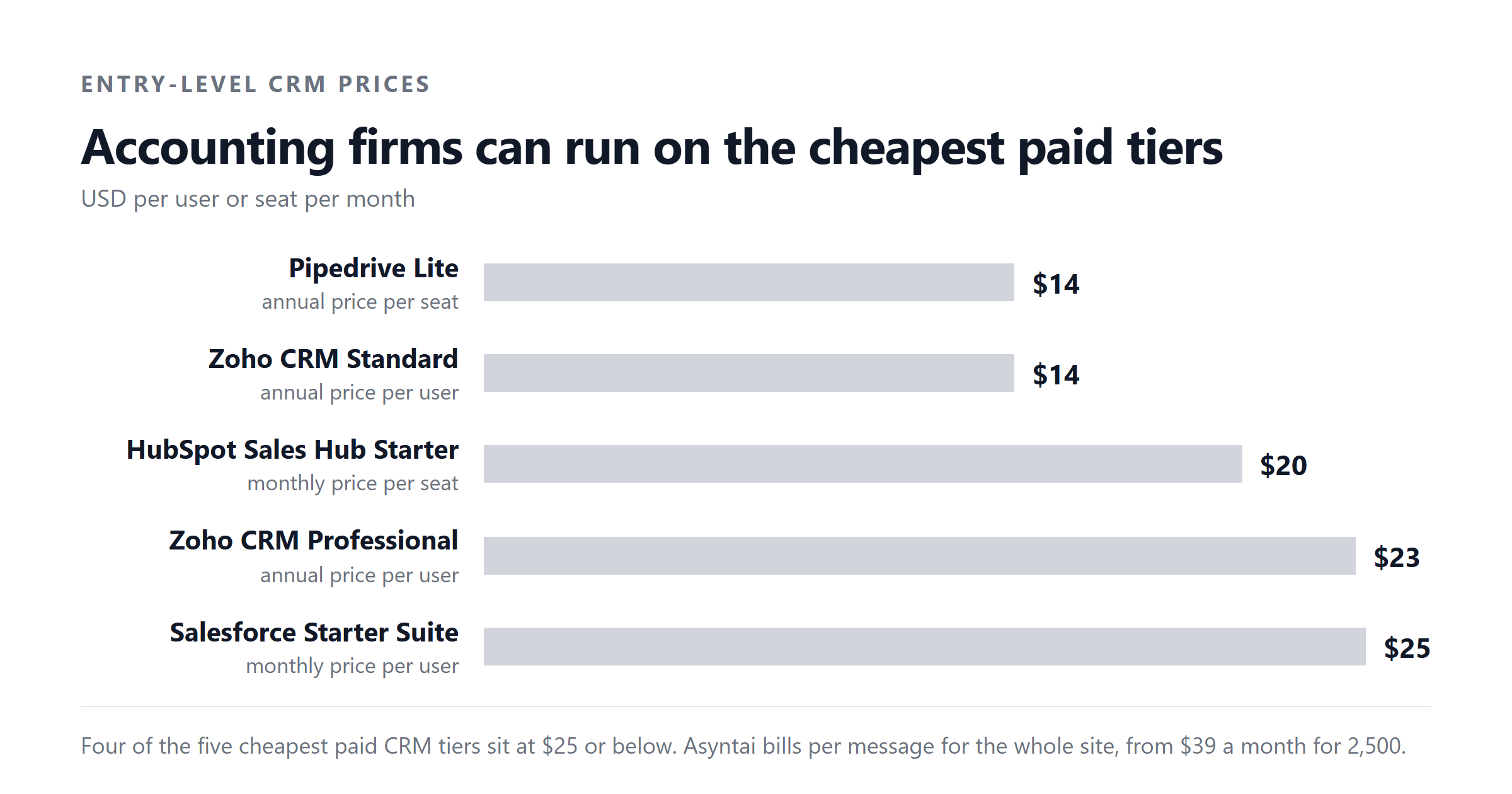
An accounting firm buys a CRM for one reason above all: knowing which client work is due and who owes a response, across a year that is wildly seasonal. A generic CRM is enough for most firms. Published entry-level prices start at $14 per user per month (Pipedrive Lite and Zoho Standard on annual billing) and reach $23 to $25 per user per month at the next tier (Zoho Professional and Salesforce Starter Suite). Most accounting practices run successfully on those lower tiers.
Two things decide the rest: whether the tool handles a tax-season surge without forcing you to buy year-round seats you only need in March, and whether it does the things a CRM cannot, such as tracking recurring compliance work and per-client deadlines.
Accounting practices are not generic small businesses. Your workload is shaped by external deadlines: personal tax in January, corporation tax in March, VAT quarters, payroll runs, year-end accounts. Your CRM has to keep a year of recurring work visible at once, and it has to survive a January-to-April crush without anyone losing track of who owes what to whom.
What an accounting firm actually tracks
A standard sales CRM models a pipeline: leads, opportunities, closed deals. An accounting practice's pipeline looks different. It runs on recurring engagements, regulatory clocks and client-specific obligations. A few of the things a partner wants to see at a glance:
- Which clients have not sent their bookkeeping for this month, and which have.
- Which personal tax returns are still outstanding, sorted by the deadline tier.
- Which clients need VAT returns filed in the next two weeks.
- Which year-end accounts are drafted, which need partner review, and which have been with the client for signature too long.
- Which clients have an unanswered email from last week that someone on the team should pick up.
- Which compliance deadlines (Companies House, HMRC, payroll) fall in the next 30 days.
None of that is exotic. Every published CRM on the market can be configured to hold it. The point is that the tool has to be configured to do it, and that the configuration does not fall over when a new compliance regime lands or a new staff member joins.
CRM versus practice management software
This is the line worth drawing before you spend anything. A CRM is built around contacts, deals and activities. Practice management software is built around clients, jobs, recurring work and time. The two overlap, but they are not the same thing, and the difference matters for accounting.
| Capability | Generic CRM (Zoho, Pipedrive, HubSpot, Salesforce) | Accounting practice management (Karbon, TaxDome, Canopy, Jetpack Workflow) |
|---|---|---|
| Contact and company records | Yes | Yes |
| Pipeline or deal stages | Yes, central to the product | Yes, but usually simpler |
| Email logging and templates | Yes | Yes |
| Recurring work templates (monthly bookkeeping, VAT, payroll) | Not built in; has to be configured | Yes, central to the product |
| Per-client job lists with deadlines | Not built in; has to be configured | Yes |
| Time tracking and billing | Not built in | Yes, usually |
| Client document portal and e-signature | Not built in | Yes, usually |
| Workflow automation (routes work to the right person) | Yes, but rules-based | Yes, and tuned to recurring compliance |
| Capacity planning across the team | Not built in | Yes, usually |
| Integrates with your accounting software (Xero, QuickBooks, Sage) | Via Zapier or a third-party connector | Usually built in |
| Website chat that answers from your existing pages | Asyntai adds this on top of any of the four CRMs | Not part of these tools |
The Asyntai row is ours, so read it as a disclosure. Practice management tools are not in this article's price comparison because the question is about CRMs. They are mentioned here only because many firms weighing a CRM purchase are really weighing whether to buy practice management software instead.
Most firms that buy a generic CRM end up configuring it to behave a bit like practice management: custom fields for recurring work, a calendar view of deadlines, saved filters for "this week's VAT returns". That works, and it is cheaper than buying a specialist tool. It only works if someone on the team is willing to own the configuration, because no generic CRM ships with "monthly bookkeeping cycle" as a built-in workflow.
What the four main CRMs cost for an accounting firm
All four vendors publish per-seat prices. None of them offer an accounting-firm discount that I could verify, so the headline numbers are the numbers. Prices below are USD per user per month on annual billing, unless stated.
| Vendor | Entry tier | Mid tier | Upper tier | Top tier |
|---|---|---|---|---|
| Zoho CRM (per user per month, annual) | $14 Standard | $23 Professional | $40 Enterprise | $52 Ultimate |
| Pipedrive (per seat per month, annual) | $14 Lite | $39 Growth | $59 Premium | $79 Ultimate |
| HubSpot Sales Hub (per seat per month, annual) | $7 Starter* | $90 Professional** | $150 Enterprise** | — |
| Salesforce Sales Cloud (per user per month) | $25 Starter Suite | $100 Pro Suite | $195 Core | $550 Max |
| Asyntai | $0 Free | $39 Starter | $139 Standard | $449 Pro |
Asyntai is sold per message, not per seat. Free covers 50 messages, Starter $39 covers 800, Standard $139 covers 15,000, Pro $449 covers 50,000. Enterprise is a signed order form with a negotiated message allowance. We make Asyntai, so read that row as a disclosure. *HubSpot Starter is $7 per seat per month on annual billing, $20 billed monthly. **HubSpot Professional and Enterprise require a one-time onboarding fee ($1,500 and $3,500 respectively) on top of the per-seat price. Salesforce Starter Suite can be billed monthly or annually; Pro Suite and above are annual.
Two things stand out. First, the entry tier for the three cheapest tools is essentially the same number: Zoho Standard and Pipedrive Lite are both $14 per user per month on annual billing. HubSpot Starter is cheaper at $7, but the feature set is thinner. Second, once you move past entry, the prices separate sharply. HubSpot Professional is $90 per seat per month, and Salesforce Pro Suite is $100. Zoho Professional is $23.
The annual cost per seat, laid out
Per-month prices are easy to compare and easy to underestimate. Here are the same numbers turned into a single annual cost per seat, using each vendor's annual-billing rate. This is what one login costs you for a year before any add-ons.
The HubSpot onboarding fees distort the first-year comparison. Spread the $1,500 onboarding fee across a year and HubSpot Professional is effectively $2,580 in year one, not $1,080. Spread the $3,500 Enterprise onboarding fee across a year and HubSpot Enterprise is effectively $5,300 in year one. After year one the recurring number is just the per-seat rate, but year one is the number your finance partner sees.
What the four tools actually include at each tier
Price tells you only whether a tool is in reach. Feature depth tells you whether it does the work. Here is what each vendor publishes at its named tiers, as of the prices checked in September 2026.
| Tool | Entry tier | What you get at entry | Mid tier | What you get at mid |
|---|---|---|---|---|
| Zoho CRM | $14/mo Standard | Standard CRM, free edition for 3 users, annual or monthly billing. Sales forecasting, document library, basic workflow rules. | $23/mo Professional | Custom modules, custom buttons, webhooks, sales signals, inventory management. The tier most accounting firms should evaluate first. |
| Pipedrive | $14/mo Lite | Core pipeline, contact and deal records, mobile app, basic reporting. No free tier; 14-day trial. | $39/mo Growth | Custom fields, activity reminders, scheduling, pipeline analytics, integrations catalogue. |
| HubSpot Sales Hub | $7/mo Starter | Free tools up to 2 users; Starter adds 500 monthly credits, email tracking, meeting scheduling. Quote and invoice tools included. | $90/mo Professional | 3,000 monthly credits, sequences, playbooks, predictive scoring. Requires a one-time $1,500 onboarding fee. |
| Salesforce Sales Cloud | $25/mo Starter Suite | Sales Cloud features in a guided package; suitable for small sales teams. AI add-on not included. | $100/mo Pro Suite | Custom objects, automation, sales forecasting, partner and territory management. AI add-on available as an extra. |
HubSpot's "credits" meter is a published unit that gates features like sending sequences, working leads and using AI tools. 500 credits at Starter, 3,000 at Professional, 5,000 at Enterprise. Additional credits are $0.01 each on annual billing. If your firm relies on sequences to chase client documents, the credit meter is the practical constraint, not the seat price.
The mid tier is where most accounting firms end up, because that is where the configuration tools arrive. Pipedrive's Growth tier, Zoho's Professional tier, HubSpot's Professional tier and Salesforce's Pro Suite are all capable platforms for a 5 to 25 person practice. The choice between them is mostly about the integrations you already use and how much configuration work you want to do yourselves.
Who each vendor suits
The four tools overlap heavily on the headline feature list, but the way they are priced and packaged suits different firms.
Zoho CRM suits firms that want the lowest seat cost and are happy to configure their own fields, modules and workflow rules. The free edition covers three users, which is enough for a sole practitioner with two staff. Zoho's bigger product suite also means the CRM plugs into Zoho Books for accounting-adjacent work without a third-party connector.
Pipedrive suits firms that think in pipelines. The product is the most pipeline-shaped of the four, which makes it fast to deploy for tracking new business wins and slow to deploy for tracking recurring compliance work. The mid tier at $39 per seat is reasonable value, and the lack of a free tier is offset by a 14-day trial.
HubSpot Sales Hub suits firms that want marketing and sales in one tool and are willing to pay the onboarding fee. The credit meter is a real constraint if you automate sequences heavily, and extra credits are billed at $0.01 each. The published first-year cost at Professional is much higher than the per-seat number suggests.
Salesforce Sales Cloud suits larger practices and anyone who needs the deepest customisation. Salesforce is the most configurable of the four, but also the most expensive. Pro Suite at $100 per user per month is the realistic floor for a practice that wants the configurability Salesforce is known for.
The seasonality problem in an accounting practice
Accountancy has two peaks. Self-assessment runs January to April. Corporation tax and year-end accounts run January to September. Outside those windows, your workload drops and your CRM seats sit half-used.
None of the four vendors sells a seasonal seat. You pay for seats by the month or by the year. There are three practical responses, and they are worth weighing before you commit to a tier:
- Pay annually for fewer seats. If you have a permanent team of five and a six-week peak that brings in two extra hands, buy seven annual seats. The annual rate is cheaper than the monthly rate at every published tier, and seven seats across twelve months is cheaper than adding seats seasonally.
- Use free or light seats for overflow. Zoho's free edition covers three users; HubSpot's free tools cover two. Casual users who need to see the calendar and log notes do not need a paid seat at all if you assign the work to a paid user as the owner.
- Deflect the spike. A meaningful share of incoming queries in January and February are the same questions every year: when is my deadline, where do I send my P60, can I extend. Those have published answers, and answering them automatically flattens the peak.
Where a website chat agent fits
For an accounting firm, the seasonal spike is mostly a website spike. New clients land on your site in January asking how to instruct you. Existing clients land on your site in March asking where to upload their tax return. The emails pile up in the inbox, and a partner spends two hours a day triaging what could have been answered on the website.
An Asyntai chat agent sits on your firm's website and answers the recurring client questions from your existing pages: how to upload a document, where to send a P60, what your fees are, when the corporation tax deadline falls. Anything it cannot answer routes straight to your team. Pricing is per message, not per seat, which suits a firm whose volume is seasonal: Free for 50 messages, $39 per month for 800 messages (Starter), $139 per month for 15,000 messages (Standard), $449 per month for 50,000 messages (Pro). Enterprise is a signed order form with a negotiated message allowance. See the current pricing.
The point of the chat agent is not to replace your CRM. It sits in front of it. The questions that have written answers on your site get answered on your site, and the questions that need a human (a missing document, a fee dispute, a complaint) reach a human. Your CRM still owns the client relationship, the recurring work calendar and the per-client deadlines. An AI live chat agent just stops the inbox from filling with questions that have answers.
What to configure before you go live
Whichever CRM you buy, three configurations matter more than the rest for an accounting practice.
| Configuration | Why it matters | Time to set up |
|---|---|---|
| Custom fields for recurring work | Every client has a recurring cycle: monthly bookkeeping, quarterly VAT, annual accounts. Without custom fields for these, your CRM is just a contacts list. | One to two days |
| Saved views for the next 30 days | Partners need a single screen showing what is due in the next month, sorted by deadline. Most CRMs ship with this as a configurable filter. | Half a day |
| Workflow rules for unanswered client emails | If an email from a client sits unanswered for more than three working days, the CRM should flag it to the engagement owner. This is the single rule that protects client experience. | One day |
If your team cannot commit those three days, the CRM will become a contacts database rather than a working tool, and you will end up reverting to spreadsheets. That is the most common failure mode for accounting practices adopting a CRM, and the one no comparison article will tell you about.
How to decide
For a sole practitioner or a two-partner firm with one admin, Zoho CRM at $14 per user per month on annual billing is the cheapest credible option that still does the work. A four-person team on the Professional tier at $23 per user per month runs at $276 per seat per year. A larger practice that wants deeper automation should look at Pipedrive Growth at $39 per seat per month ($468 per seat per year) or HubSpot Professional at $90 per seat per month ($1,080 per seat per year plus the $1,500 onboarding fee in year one).
Salesforce is the right choice only if your practice needs the configuration depth and is happy to pay $100 per user per month or more for it. Smaller practices usually do not.
Whichever tool you pick, the configuration work is the same three days. The CRM is the system of record for client relationships and recurring work; the chat agent on your website is the front door for the questions that arrive in January. Used together, they replace the spreadsheet, the shared inbox and the partner's triage hour.
Sources
Zoho CRM published pricing, checked 2026-09-04 (zoho.com). Pipedrive published pricing, checked 2026-09-04 (pipedrive.com). HubSpot Sales Hub published pricing, checked 2026-09-04 (hubspot.com). Salesforce Sales Cloud published pricing, checked 2026-09-04 (salesforce.com). Asyntai published pricing, checked 2026-09-04 (asyntai.com).