An OpenCart live chat extension is a connector, not the chat service itself. You pay once for the extension and then pay the chat provider every month for as long as you use it. The OpenCart extension market is also split in two: extensions that simply load a script tag from a hosted chat vendor, and extensions that wrap a live chat product inside the OpenCart admin panel.
Most roundups only quote the one-time extension price. That figure is the smallest part of what you spend. The monthly service behind the widget, which is what actually answers your customers, is where the cost lives.
This article is about the two layers separately: what the OpenCart extensions cost as a one-time purchase, and what the chat service costs on a monthly meter. It also covers what you get for each price, because a free widget and a $400-a-month AI agent sit at very different points on the same spectrum.
What an OpenCart live chat extension actually is
An OpenCart live chat extension is a small module that lives in your OpenCart admin under Extensions > Extensions > Modules. Once installed, it does two things.
- It loads a chat vendor's JavaScript on every storefront page, or on the pages you choose. Most extensions let you pick the routes (home, category, product, checkout) and decide whether to exclude logged-in admin pages.
- It passes shop-specific data into the widget so the agent knows who is browsing. The minimum useful fields are the customer's name, email and the current cart contents. Better extensions also push order history, last login and language.
That second part is what an extension gives you that a plain script tag does not. With a raw script tag you get the widget. With an OpenCart extension you get the widget plus a live view of who is on the site and what they have in their basket. The price for that integration is the extension.
It is not a chat service. It does not provide an inbox, it does not provide agents, and it does not provide AI answers. For those you still pay the underlying vendor on whatever monthly meter they sell.
Two ways to add chat to OpenCart
| Approach | What it does | Cost shape |
|---|---|---|
| OpenCart extension (paid module) | Loads the vendor's widget and passes OpenCart data (customer, cart, order) into the agent console. | One-time module fee, then the vendor's monthly plan. |
| OpenCart extension (free module) | Same as above, for a free or freemium chat vendor such as tawk.to or Crisp's free tier. | Free module, free or low monthly fee from the vendor. |
| Script tag only | Paste the vendor's JS snippet into your theme's header file, or into a header/footer field exposed by your theme. | No module fee. You still pay the vendor monthly if you pick a paid plan. |
| Asyntai script tag | Paste a single snippet into the same theme field. No OpenCart module is required. | Free, Starter, Standard, Pro or Enterprise. No module purchase. |
The last row is ours. Read it as disclosure. Asyntai is a hosted AI chat agent that installs via a script tag, so the OpenCart extension route is not how we ship. The other rows show that the script-tag approach is standard practice, not a workaround.
The practical upshot: if the only thing an extension does is load a script that you could paste yourself, the value is in the data wiring, not the widget. Decide whether you want that data wiring before you pay for a module.
What the OpenCart extension modules cost
The OpenCart marketplace lists extensions built specifically for popular chat vendors. Prices below are typical list prices pulled from the marketplace and from individual vendor sites. They are one-time fees for the module itself.
| Module | One-time fee | Vendor monthly fee | Notes |
|---|---|---|---|
| Tidio module for OpenCart | Free | From $0 to higher tiers | Free in the marketplace. Vendor is metered by conversations per month. |
| Crisp module for OpenCart | Free | From $0 to $295/mo | Free module. Vendor is metered by seats and contacts. |
| tawk.to module for OpenCart | Free | $0 or $19/mo | Free module. Vendor is free with branding, $19/mo removes it. |
| LiveChat module for OpenCart | Around $20 to $40 | From $19 to $79 per agent per month | Paid module in some third-party listings. Vendor is metered per agent. |
| Generic "Live Chat" OpenCart modules | $10 to $50 | Depends on vendor | Many are wrappers that load a script tag and add a few options. Quality varies. |
Module prices in the OpenCart marketplace are set by the publisher and change frequently. The figures above are a range drawn from listings checked in September 2026, not a fixed price list.
The headline observation: the most-used OpenCart chat modules are free, because the vendors themselves publish them. A paid module is only worth it when it ships OpenCart-specific data wiring that a script tag cannot do on its own. Even then, the price is small relative to a year of the vendor's monthly plan.
What the chat service costs monthly
This is the number that decides the purchase. The OpenCart module is a one-off. The chat vendor is a recurring invoice for as long as you keep the widget live.
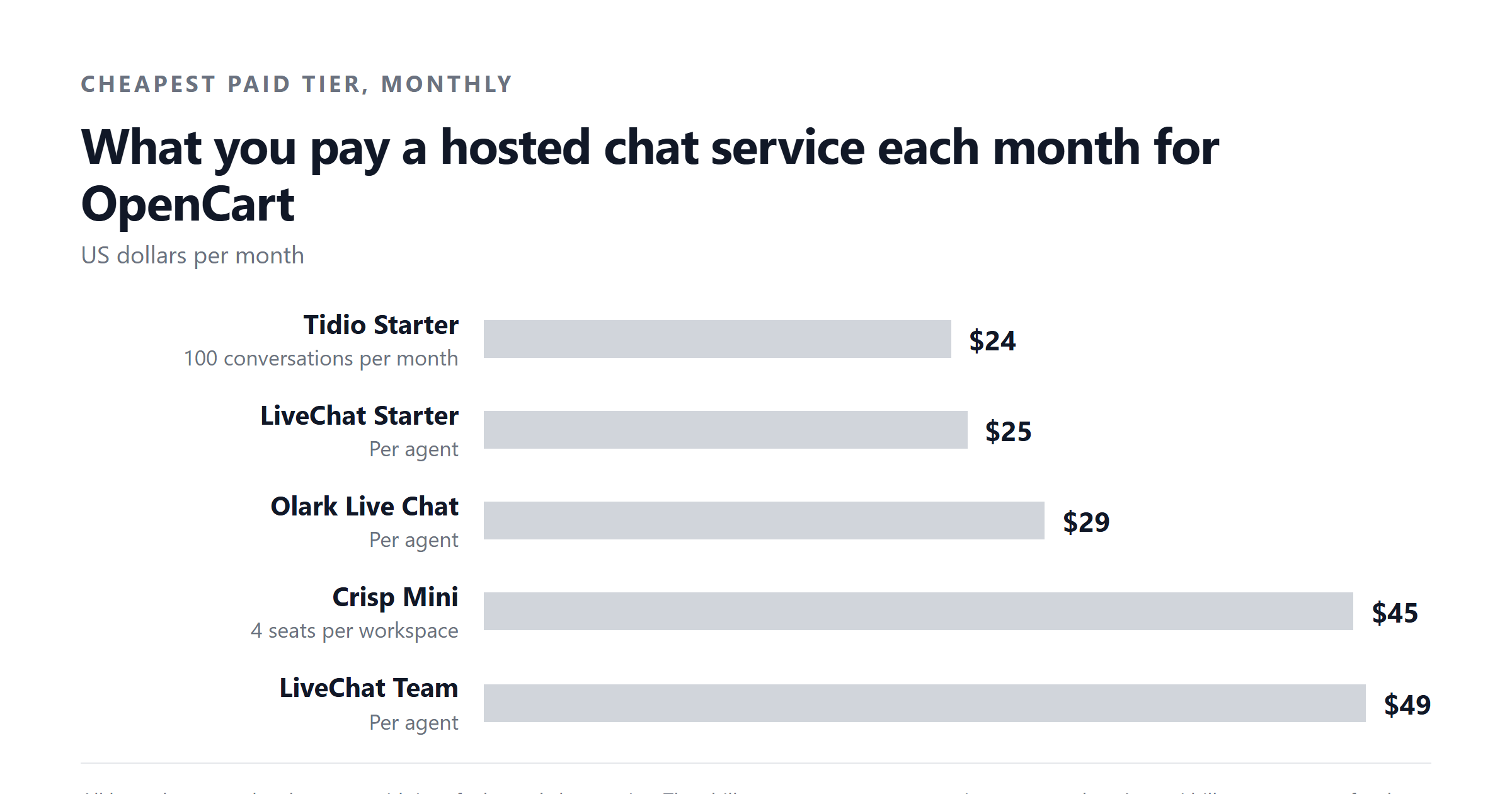
| Vendor | Meter | Lowest paid price | Mid-tier price | What you get |
|---|---|---|---|---|
| LiveChat | Per agent per month | $19 | $49 | Live agent inbox. Starter and Team tiers, billed annually. Monthly billing raises each tier. |
| Crisp | Per workspace per month | $45 | $95 | Multi-channel inbox with a free 2-seat tier. Mini and Essentials. |
| Tidio | Per conversation block | $24.17 | From $49.17 | Live chat plus AI helpers. Starter at 100 conversations, Growth at 250+. |
| tawk.to | Branding removal | $19 | $19 | Free with tawk.to branding shown. $19/mo removes it. |
| Olark | Per seat per month, with separate AI plan | $29 | $400 | Live chat at $29/agent/mo. AI Website Agent at $400/mo billed annually ($4,800/yr) with the first seat included. |
| Asyntai | Per message allowance | $39 | $139 | AI chat agent. Starter 800 messages, Standard 15,000, Pro 50,000. Enterprise on a signed order form. |
We make Asyntai, so read that row as a disclosure. The other rows are first-party prices taken from each vendor's own pricing page, checked September 2026.
Look at the meters. They are not comparable to each other without translating. LiveChat and Olark are per agent. Crisp is per workspace with extra seats added. Tidio is per conversation block. tawk.to is a flat fee to remove branding. Asyntai is per message allowance. A "lowest paid price" column hides this. The total bill for a small OpenCart store with two support agents and 3,000 chats a month will look very different across the five vendors, and the only honest way to compare them is to translate each meter into the same unit.
Translating the meters into one number
The simplest translation is: what does it cost to run chat on a small OpenCart store for a year? Use the lowest paid tier for each vendor, then add realistic headcount or volume for that size of shop.
Take a store with two agents, 3,000 visitor conversations a month and no AI features. The annual figure for each vendor's lowest paid tier is:
These are the cheapest paid plans each vendor publishes. None of them include the AI features that Olark, Tidio and Crisp sell on higher tiers. Asyntai's Starter plan at $39/month sits in the same range:
What changes the comparison is whether you want AI answers or live human agents. Adding Olark's AI Website Agent to the picture is a different order of magnitude.
That is the same order as a single Olark live chat seat for 16 years, billed once. AI features shift the bill, but only because the AI meter is separate from the seat meter at most vendors. Asyntai's higher tiers fold AI and chat into one message allowance, which is why the Standard plan at $139/month and Pro at $449/month exist.
Why a script tag is the standard install
OpenCart themes ship with header and footer slots that load arbitrary HTML. Every modern chat vendor publishes a JavaScript snippet designed to be pasted in. The vendor's own documentation will usually walk you through this, and it is the install path most stores use.
The OpenCart extension route exists because some stores want customer and cart data wired into the agent console without writing PHP. That is a real value, but it is a specific value, and it costs a one-time fee that you should weigh against the monthly fee you would pay anyway.
If you do not need that data wiring, you do not need an extension. Paste the snippet, save the file (or paste it into the theme settings field), and you have a free chat widget on every page. The OpenCart marketplace is full of free extensions that do exactly this, which is itself evidence that the script-tag install is the default.What you give up by skipping the extension
The trade-off is mostly data, not features. Without an extension, the agent sees a visitor on a page. With an extension, the agent sees:
- The customer's name and email, if they are logged in or have an account.
- The contents of the cart, including quantity and options.
- The customer's order history, including last order status.
- The OpenCart customer group, which can be useful for B2B stores with tiered pricing.
For a small store where most chats are anonymous, none of that matters. For a store with logged-in repeat customers, it is the difference between "someone is on the product page" and "Sarah, who has bought from us three times, is looking at this specific SKU". Live agent products lean hard on that data because humans can act on it. AI products lean less on it because the conversation itself generates the context.
When the extension purchase is worth it
Pay the one-time module fee when at least one of these is true:
- You run a B2B store with logged-in wholesale customers and the agent needs to see who they are before answering.
- You want pre-chat fields populated from the customer account (name, email, last order) without asking the visitor to retype them.
- You want offline messages dropped into the OpenCart contact form or the customer's order notes, not into the vendor's inbox only.
- You have a non-standard theme and the header slot is not exposed in the admin. The extension is sometimes the only sane way to inject the snippet.
If none of those apply, paste the script tag and skip the module. You will save the one-time fee and not lose anything that matters to a small store.
When the script-tag approach is wrong
It is wrong when you specifically want OpenCart data inside the vendor's UI and the vendor's native integration does not expose it. Most live-agent products do expose this through their own JavaScript API, which means an experienced developer can wire it without a paid module. Most stores do not have that developer, which is why the modules exist and why they sell.
It is also wrong when your theme is heavily customised and the header/footer fields do not load on every page. The OpenCart extension route guarantees the snippet runs on the pages you pick. The script-tag route is only as good as your theme's hooks.
Where Asyntai fits
Asyntai installs as a script tag, which is why the extension route is not how it ships. The install is the same snippet you would use for any other chat vendor: paste into the theme's header file or into a header field exposed in the OpenCart admin, save, and the agent is live.
The pricing is metered by messages, not seats. The Free plan covers 50 messages. Starter is 800 messages for $39/month. Standard is 15,000 messages for $139/month. Pro is 50,000 messages for $449/month. Enterprise is a signed order form with a negotiated allowance, which is not sold self-serve.
For an OpenCart store, the relevant question is how many chat conversations the agent will have per month, not how many human agents you have on shift. AI answers do not need seats. A single Starter plan covers a small store with a few thousand conversations a month, and it is the same invoice whether you have one person reviewing transcripts or none.
OpenCart-specific gotchas
Three things bite OpenCart stores that are not obvious from a vendor's pricing page.
Extensions and themes break independently. When you upgrade OpenCart or change theme, the extension may stop loading the snippet. A script tag pasted into a theme header file breaks for the same reason. Either way, you will discover it the first time a customer tells you the chat is missing.
Multi-store OpenCart installations need separate decisions. If you run several stores from one OpenCart install, each store typically needs its own vendor account. The extension may install across all stores by default, which can mean the wrong agent is answering on the wrong store.
Checkout pages are sensitive. Loading third-party JavaScript on /checkout or the one-page checkout can break the page or slow it down, which costs sales. Most extensions and most script-tag installs let you exclude routes, and you should exclude checkout and account pages by default.
A simple decision path
Start by deciding whether you want AI to answer or humans to answer. The two are different products and the meters are not comparable.
If you want humans, your decision is about the per-agent or per-workspace meter, the free tier, and the OpenCart data wiring. LiveChat, Crisp, Olark and tawk.to all fit there. The cheapest annual bill at two agents comes from tawk.to with branding removed, the cheapest bill with full features comes from Crisp Mini.
If you want AI, your decision is about message allowance and what the AI can do without a seat. Olark's AI Website Agent at $400/month is the only first-party AI plan in this list with a published price. Tidio, Crisp and Asyntai all bundle AI into higher conversation or message tiers. Asyntai's Standard plan at $139/month for 15,000 messages is the most generous message allowance at the mid tier.
Either way, install the script tag first. If you discover you need OpenCart data inside the vendor's console, add the OpenCart extension on top. The extension is a polish step, not a prerequisite.
Asyntai installs on OpenCart with a single script tag. No module purchase, no per-agent fee, and the Standard plan covers 15,000 messages a month for $139. See the plans.
Sources
- LiveChat pricing page, checked 2026-09-04.
- Crisp pricing page, checked 2026-09-04.
- Tidio pricing page, checked 2026-09-04.
- tawk.to pricing page, checked 2026-09-04.
- Olark pricing page, checked 2026-09-04.
- OpenCart marketplace module listings, checked September 2026.
- Asyntai pricing page, checked 2026-09-04.