Most of the questions arriving at a freight or logistics site are answerable from the site itself. Track-and-trace lookups, document requirements by lane, cut-off times, chargeable weight rules, incoterm definitions, demurrage and detention rules: all of these sit on published pages, and a chat layer that points at them clears the queue without a human typing a reply. The questions that need a live answer are the ones that need the TMS, the carrier API or the warehouse system, and a chat layer can route those straight to the right desk with the right context attached.
The job is to publish the answers that already exist, and to be honest about the ones that need a system the customer cannot see.
Logistics support looks like every other support queue until you sit with it for a week. Then three things stand out. The first is that the questions are narrow and repeated. A small number of categories make up most of the volume: where is my shipment, what documents do I need, what time do I need to be there, why is my bill the size it is, and what does this word on the invoice mean. The second is that the answers are usually already on the website, and the only reason anyone is asking is that the search box on the site is not very good and the navigation is dense. The third is that the questions that genuinely need a human all need a system the customer has no access to, which means the human needs to be looking at the right screen before they say a word.
This shapes the whole conversation. A chat layer that pulls from published pages will handle the majority of volume. A chat layer that promises to handle the live operational questions without the systems behind them will fail, and fail loudly, because the first time it tells a customer that their container is on the wrong vessel it has cost the company the relationship.
The questions a logistics chat actually gets
Before choosing anything, log two weeks of inbound questions and tag them. Six categories cover most freight and logistics inboxes, and the tag tells you where the answer has to come from.
- Where is my shipment. Status by booking, container, MAWB, HAWB, AWB or order number. The answer lives in the carrier API or the TMS, not on the website.
- What documents do I need for this lane. Commercial invoice, packing list, certificate of origin, EUR1, ATR, bill of lading, airway bill, dangerous goods declaration, ISF 10+2 for US imports. The answer is lane-specific, and the lane list is a published page.
- What is the cut-off time, and have I missed it. Port cut-offs, container yard cut-offs, cargo closing at the airline, booking cut-off at the broker. The answer is on the published schedule and in the operations system.
- What is chargeable weight, and why is my invoice the size it is. The rules are published (IATA volumetric divisor 5000 for air, road and ocean conversion factors). The application of those rules to a specific shipment needs the weight and dimensions from the booking.
- What does this charge on my invoice mean. Demurrage, detention, per-diem, chassis usage, BAF, GRI, PSS, fuel surcharge, congestion surcharge. Most of these have a published definition on the freight forwarder's site.
- Which incoterm applies, and what does it actually shift to me. Ex Works, FCA, FOB, CFR, CIF, DAP, DDP. The definitions are published by the ICC. The choice on a specific quote is on the sales confirmation.
Document requirements by lane
Cut-off times
Chargeable weight rules
Incoterm definitions
Demurrage and detention rules
Booking a pickup
Re-routing a load
Custom clearance holds
Claims and refunds
Rate quotes on a specific lane
What the chat can answer from published pages alone
Anything that ends with "what is" or "what are the requirements for" is a candidate. The answer is on the site already. A chat layer can read the page, summarise the relevant paragraph in two sentences, and link to the source so the customer can check the detail. This is the work a well-configured chat layer does well, and it is most of the volume.
Documents by lane is the single highest-value answer to automate. Customers ask it before every booking, and a lane matrix that lists destination, mode, commodity and required documents is the kind of page that ships and freight forwarders have on their site already. The chat layer reads it and answers in the customer's own words, which is what most people want instead of hunting through a PDF.
Incoterm definitions are the second highest. The ICC publishes the official definitions and most freight forwarders republish them with their own commentary. The chat layer answers the definition in plain English, points at the ICC source for the legal wording, and asks the customer which quote they are working from so a human can confirm what was actually agreed.
Demurrage, detention, per-diem and the alphabet of surcharges are the third. A glossary page with definitions and the day rates by port or trade lane answers most of the "what is this charge" traffic. Where it gets tricky is the "why is mine so high" follow-up, which needs the container history from the carrier system.
Cut-off times are the fourth. The published sailing or flight schedule is the source of truth for the standard case. The chat layer can answer "what is the cargo closing for Friday's LHR flight" from a published page. It cannot answer "is my booking on that flight" without the booking system, and that hand-off needs to be clean: the chat should hand the customer's booking reference to a human along with the question, not leave the customer to retype it.
What the chat cannot answer from published pages
Anything that starts with "what is happening with my" needs the live system. Where is my container, what is the ETA now, why has my shipment been held, has the carrier confirmed the booking, when will the chassis be released. None of those questions have an answer on a static page, and pretending otherwise is the failure mode that loses customers.
The honest answer is that a chat layer can still help here, but only as a router. It should recognise that the question needs the TMS or carrier API, and it should hand the question to the right desk along with the booking reference and the page on the site the customer was reading. That second piece matters: when the human picks it up they already know what the customer has already been told, and they do not start from scratch.
The systems behind a freight operation also have permissions, and not everyone should see everything. A chat layer that pulls from the TMS without a permission model will tell a broker's customer about another broker's booking. This is the single largest reason logistics companies have not put a chat layer in front of operational data, and it is a real reason, not a vendor objection.
What to publish so more questions are answerable
The fastest way to grow the share of questions a chat layer can answer is to publish more, not to buy a cleverer model. Three pieces of content move the needle in freight and logistics.
A lane document matrix. For each lane your company actually serves, a page listing the destination country, the mode, the commodity type, and the documents that must accompany the shipment. Most freight forwarders have this in a PDF inside a sales pack. The PDF is fine for humans who already know the structure. It is useless for a chat layer. The same content on a structured page, with one section per lane, is what the chat layer reads.
A published glossary with the surcharges the company actually applies. Demurrage, detention, chassis usage, fuel surcharge, BAF, GRI, PSS, congestion surcharge, security surcharge, documentation fee. Each one with a plain-English definition, the unit (per container per day, percentage of freight, per shipment), and where to find it on the customer's invoice. The customer who can read their own invoice stops ringing about it.
An operations schedule. Sailing schedules by trade lane, cut-off times by origin port, cargo closing times by flight. Published, machine-readable, and updated on a cadence the chat layer can rely on. A schedule that is six weeks out of date is worse than no schedule, because the chat layer will give the customer a cut-off they have already missed.
The arithmetic on how much volume these three pages deflate is worth doing. Take the share of last month's inbound that was documents-by-lane, glossary or cut-off, and you have the upper bound on what a chat layer reading your own site can answer.
The numbers in the block are a worked example using the kind of shape a freight inbox takes, not published averages. A company that measures its own two weeks of inbound will get its own ratio, and it will probably land within a few points either way.
What a chat layer costs when it answers from your own pages
The plans that read from your own content and answer from it have a simple shape: a monthly fee, and a message allowance. The arithmetic below uses Asyntai's published plans, which are the plans Asyntai sells and the figures for which are checked for this article.
For the worked example of 1,500 chats a month, Standard covers the volume at $139 a month, which is $1,668 a year. A smaller site that stays within 800 messages a month fits Starter at $39 a month, which is $468 a year. For 5,000 chats a month Standard still covers it with room to spare. For 15,000 chats a month the company sits inside Standard. For 50,000 a month Pro is the self-serve fit at $449. Beyond that, Enterprise is a signed order form with a negotiated allowance, and it is not sold self-serve, so no self-serve figure applies on copy aimed at that audience.
The cost of each chat on these plans is a useful number to know, and it is one you can work out from the figures above.
The pattern is the usual one: the higher the plan, the lower the per-message cost. For a freight operation at 1,500 chats a month on Standard, every message handled by the chat layer rather than by an agent is roughly $0.009 of software cost, which is the number to put against the agent time saved.
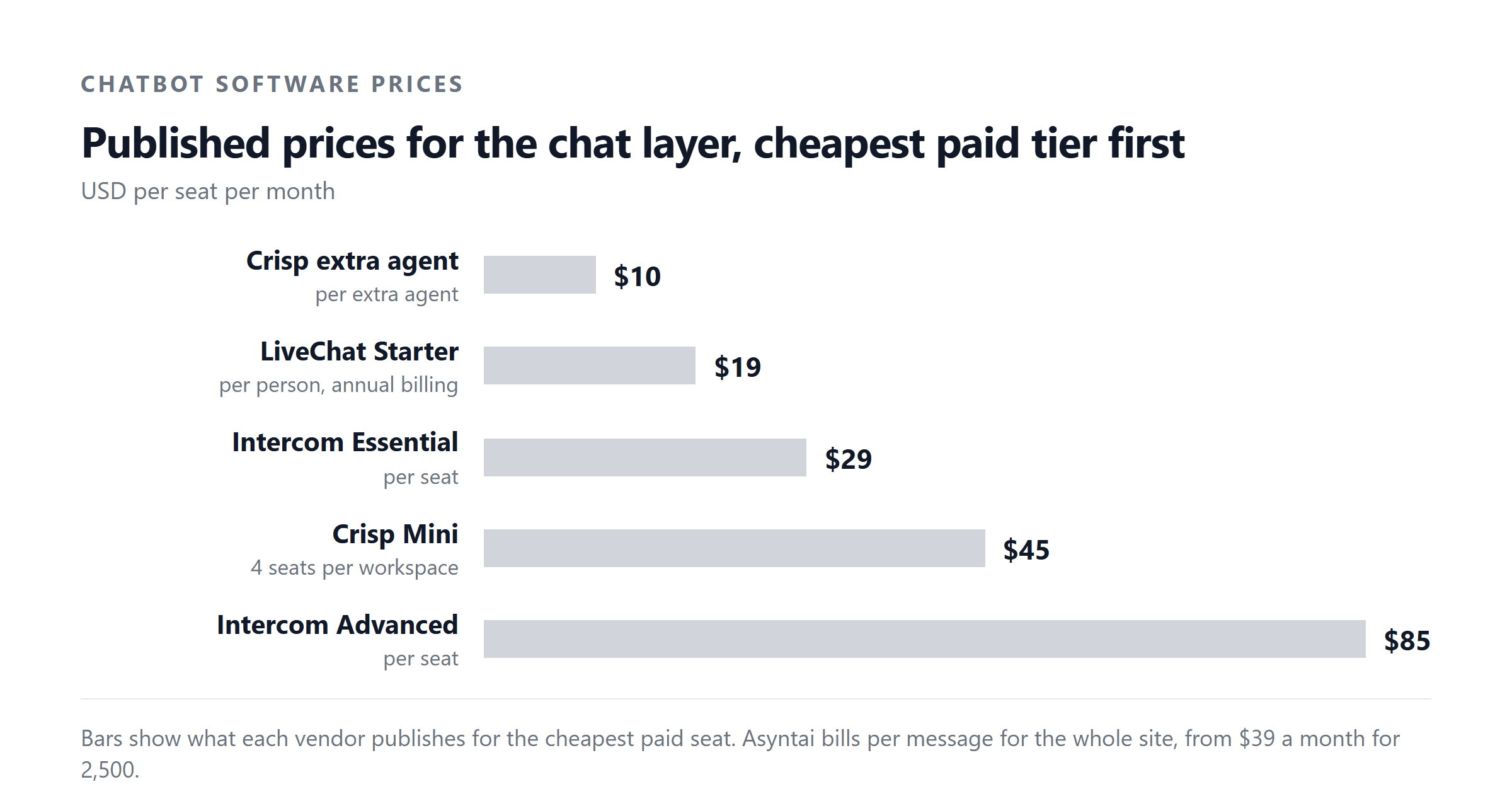
The cost you cannot compute from these figures is the per-chat cost on a per-seat product, because the FACTS for this article only cover one such product (Intercom, $29, $85 and $132 per seat, with a $0.99 per resolved outcome for the AI), and one data point is not a price ladder. If you are comparing per-seat with per-message for your own operation, the only honest comparison is the one you run against your own chat volume and your own seat count, both of which you have to measure yourself.
The hand-off that decides whether customers trust the system
A logistics customer who is told by a chat layer that their container will be on the next vessel, and then finds out it will not, is a lost customer. The chat layer has to know which questions it can answer from published pages and which it cannot, and the moment a question crosses the line it has to hand off with context.
Three things make a hand-off work in freight. The first is that the chat layer passes the booking reference, the customer's name and the page the customer was reading, so the human who picks it up does not start from zero. The second is that the human who picks it up is looking at the right system when they reply, which means routing the conversation to the desk that owns the booking, not the general inbox. The third is that the customer is told what is happening next: who will reply, in roughly how long, and what the customer can do in the meantime. A hand-off that leaves the customer waiting in silence is the same as no hand-off.
Where the chat layer should not be allowed to answer is anything about the live position of a shipment. "Where is my container" is the question the customer always asks first, and it is the question that needs the carrier API or the TMS. A chat layer that is not connected to those systems can still help by acknowledging the question, asking for the booking reference, and routing it to the operations desk. What it must not do is invent an answer.
What to measure
Two numbers tell you whether the chat layer is doing the job, and both are easy to measure on your own traffic.
The first is deflection rate: the share of chats that ended without a human replying. Take the total chats in a month and subtract the chats that were routed to a human or that ended with a request for a human reply. That share, on the same kind of traffic, is the upper bound on what the chat layer is saving. A deflection rate above half on the published-page categories is a healthy result for a first quarter. Below a third and the configuration is not doing the work.
The second is handoff quality: when the chat layer does pass a question to a human, does the human have what they need to reply in one touch? Measure how often a handed-off conversation needs more than one reply from the agent to reach a resolution. If most handed-off chats need a back-and-forth to gather the booking reference or the lane, the hand-off is not yet working.
Two numbers matter less than the first two but are worth tracking. Time to first reply on handed-off chats tells you whether the routing is reaching the right desk. Customer satisfaction on chats that the chat layer resolved end-to-end tells you whether the answers from the published pages are landing.
What changes the answer
Volume changes the plan. The arithmetic earlier in the article shows the three self-serve plans and where 1,500, 5,000, 15,000 and 50,000 chats a month each land. A freight operation that does 5,000 chats a month sits comfortably inside Standard. One that does 50,000 sits inside Pro. One that does 100,000 is in Enterprise territory, and the self-serve plans do not apply.
Lane complexity changes the publication work. A freight forwarder that handles five trade lanes can publish a lane document matrix in a day. One that handles fifty needs a maintainable structure, ideally with one URL per lane so the chat layer can read each one cleanly. The investment is in the publishing, not in the model.
Opening hours change the value. A logistics operation that takes customer calls from 8am to 6pm in one time zone leaves the rest of the world to wait. A chat layer that answers from published pages runs at 3am on a Sunday in the same way it runs at 3pm on a Tuesday, and for a global freight business that is the largest single reason to deploy one.
Team size does not change the plan in the way it changes a per-seat product. The self-serve plans are priced by message volume, not by how many humans are behind the operation, which is the structural difference from the per-seat products that have been the default in logistics customer service for years.
The mistake most freight and logistics companies make
The mistake is to treat the chat layer as a replacement for the operations desk, and to measure success on whether customers got an answer, rather than on whether they got a right answer. The first time the chat layer tells a customer that their shipment is on a vessel that the carrier system shows it is not on, the relationship is over, and the second time the customer tells the freight market about it.
The fix is to draw the line cleanly. The chat layer answers from published pages. Anything that needs the TMS or the carrier API is handed off, with the booking reference and the customer context. The chat layer is also told when it does not know, and the customer is told that it does not know, instead of an invented answer dressed up as a confident one. This is more valuable than it sounds, because the customer who is told "I do not have access to your booking, I am passing this to the operations desk now" is a customer who trusts the next answer.
The other mistake is to launch without the published pages in place. A chat layer with no glossary, no lane matrix and no operations schedule is a chat layer that has nothing to read, and the share of questions it can answer will be small. The pages come first. The chat layer second.
Asyntai reads your own published pages and answers from them, with a clear hand-off to your team when the question needs your TMS or carrier system. Plans run from a free 50-message tier up to a 50,000-message self-serve plan, with a signed contract above that. See the plans or put a chat layer on your site and see what it can answer from what you already publish.
Figures used in this article
- Asyntai plan prices and message allowances: asyntai.com pricing page, checked for this article.
- Asyntai capabilities (OIDC single sign-on, per-tab permissions, append-only audit log, configurable PII redaction, separate output classifier, configurable chat retention, script tag and Code Injection install): asyntai.com product page, checked for this article.
- Intercom seat pricing and Fin AI per-resolved-outcome charge: Intercom's own pricing page, checked 4 September 2026.
- IATA volumetric divisor of 5000 for air cargo: IATA cargo industry standards.
- Incoterm definitions (Ex Works, FCA, FOB, CFR, CIF, DAP, DDP): International Chamber of Commerce, Incoterms 2020.
- US import ISF 10+2 filing requirement: US Customs and Border Protection.