Site search that understands what people mean
Your visitors do not know your product names. Let them describe what they need in their own words, and show them the right product or page straight away.
Works on any website. No card needed to try it.
Ordinary search waits for the exact word
Type a word your catalogue does not use and a normal search bar gives you nothing. That visitor leaves. AI search reads the meaning instead, so a description finds the product.
They describe, you sell
A shopper types that their knees hurt going downhill. The search shows trekking poles. Nobody had to know the product name.
Real product cards
Results show the photo, the name and the current price, pulled from your product feed. One click and they are on the product page.
Answers, not just products
Delivery, returns and size guides come back too, so a question about shipping does not turn into a support email.
Every language
Visitors search in their own language even when your content is written in another one. The search bar labels itself in their language too.
Forgiving of typos
Half typed words and misspellings still find the right thing, because the search matches meaning and word stems, not exact letters.
Nothing to maintain
It uses the same content as your Asyntai chatbot. Add a page or a product once and both know about it.
Live in a few minutes
No rebuild, no migration, no search engine to configure.
Paste one snippet
Put it wherever the search bar belongs, usually your header. It works on any platform.
Asyntai already knows your site
It searches the content you added for your chatbot: your pages, your documents and your product feed.
Visitors start finding things
Results appear as they pause typing, with images and prices for products and a preview for pages.
Already have a search bar? Swap it.
Add one attribute and the widget finds the search form your theme already has, hides it, and takes its place. You do not have to touch your layout.
Pressing Enter still opens your old results page, so nothing your visitors know stops working.
- Works with Shopify, WooCommerce, WordPress and custom themes
- Keeps your colours, your placeholder text and your labels
- If it cannot find your form, it changes nothing at all
Find out what your customers cannot find
Every search is recorded, so you see what people look for and, more usefully, what they searched for and got nothing. That list is a to-do list written by your customers.
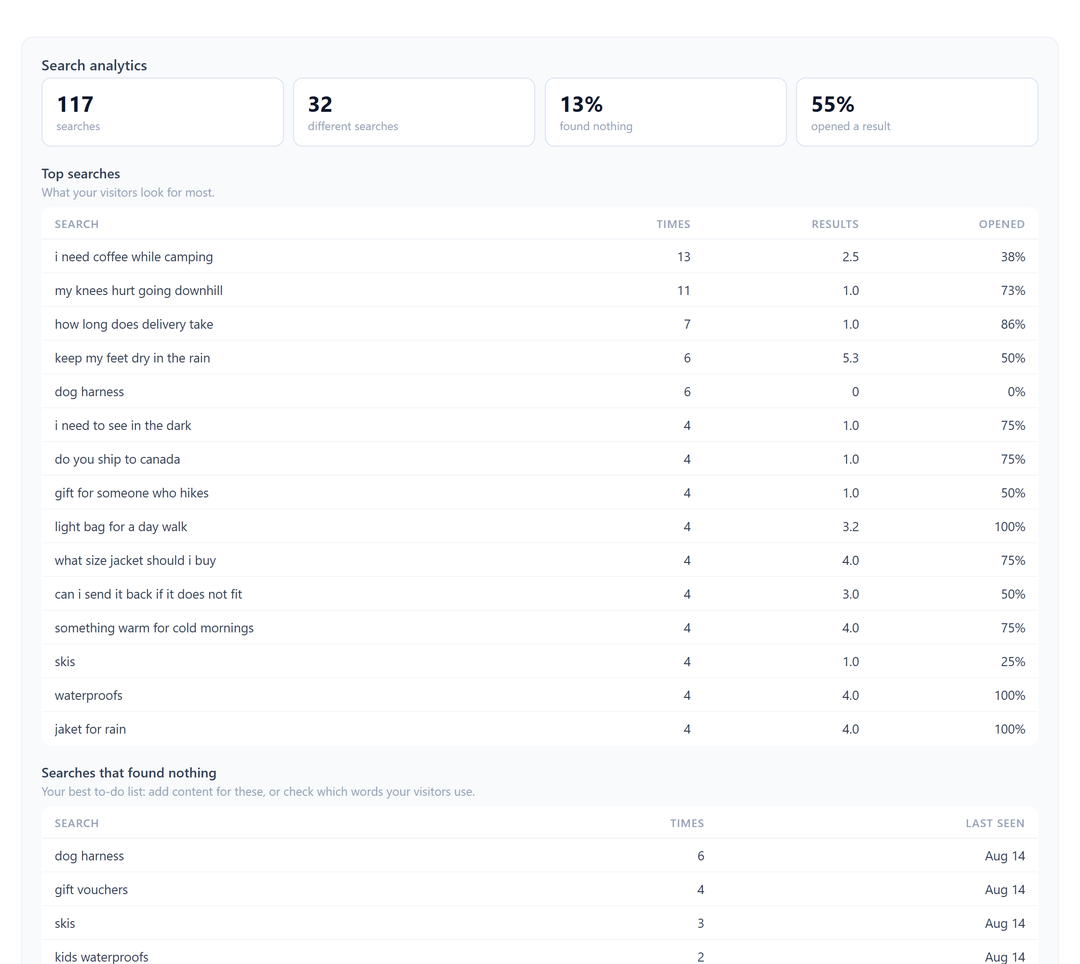
You can switch recording off at any time. Then nothing is stored.
When search finds nothing, the assistant takes over
A dead end is where most search tools give up. If your Asyntai chatbot is on the same page, the search bar offers to hand the question over instead.
The visitor keeps their question and lands in the chat with it already typed. A lost search becomes a conversation, and often a sale.
No search-only tool can do this, because none of them have an assistant to pass the question to.
Common questions
Which plans include it?
The Standard plan and above. Each search a visitor runs uses one AI reply from your monthly allowance, the same allowance your chatbot uses. Searches you run yourself while testing are free.
Do I need a product feed?
No. Without one you still get page results from your website content. With a feed you also get product cards showing image and price.
Will it slow my site down?
No. It is one small script with no dependencies, and it loads after your page. Nothing is requested until a visitor starts typing.
Can I control what it searches?
Yes. Two switches decide whether it uses your website pages, your data feed, or both.
What about visitor privacy?
Search text is never linked to a person. You can turn recording off completely, and if you use Zero Retention Mode nothing is stored at all.
Give your visitors a search bar that answers
Set up Asyntai once and get an AI chatbot and AI search together.