An HR help desk is not an IT help desk with different labels on the queues. HR tickets are confidential. Often they are about a person's manager, pay, or a grievance. The wrong person seeing one is a serious incident, not an inconvenience.
That makes access control and a private queue the deciding factors for this purchase, not the feature list. The published price is only useful once you know which tier actually gates permissions.
Most comparison articles treat HR as a thin vertical of the IT help desk market. It is not. The data is more sensitive, the user population is wider than IT ever serves, and the regulatory frame (GDPR in the UK and EU, state-level rules in the US, sector rules in healthcare and finance) is stricter than the one your IT team works under. Here is what that means for the buy.
What an HR ticket actually looks like
People open HR tickets because they cannot ask face to face. The reason they cannot ask face to face is the sensitive content. So a typical queue carries some mix of:
- Pay queries, including payroll corrections, tax code changes, and queries about deductions.
- Leave, sickness absence, and return-to-work paperwork.
- Grievances, harassment reports, and dignity-at-work concerns.
- Flexible working, parental leave, and time-off requests.
- Job reference, employment confirmation, and proof-of-employment requests.
- Personal data changes: bank details, address, next of kin, name.
Some of those can be answered from a policy page on your intranet. Most cannot. The ones that cannot are the ones your queue exists for, and they all need to be visible only to the people who need to see them.
If your "HR queue" is just a label inside the same IT help desk your developers use, with the same agent list and the same role permissions, that is not an HR help desk. It is a labelled folder. You need to know, before you buy, who can read a ticket in that folder.
does not gate
gates
does not gate
gates
does not gate
gates
Access control is the feature that decides this
Five concrete things have to be true before a tool is safe to put an HR queue into. None of them are negotiable, and most are gated to a paid tier.
| Requirement | What it has to do in practice |
|---|---|
| Restricted agent groups | Only named HR agents can see HR tickets. Line managers see only their own direct reports' tickets, never the global queue. |
| Private queue separation | HR lives in a separate workspace from IT. There is no shared search across both. |
| Field-level redaction | Sensitive fields (pay, medical, banking) can be hidden from view by default and revealed on click with a logged action. |
| Audit log that cannot be edited | Every read, every redaction reveal, every export is recorded. Entries cannot be deleted by an admin. |
| SSO with your directory | Agents log in with the same identity they use for email. Off-boarding removes access instantly. |
The table below maps those requirements to the published tiers. Two things stand out. First, several tools only gate per-role permissions on their mid or upper plan. Second, some tools have no HR-specific permissions at all and rely on you to model them yourself.
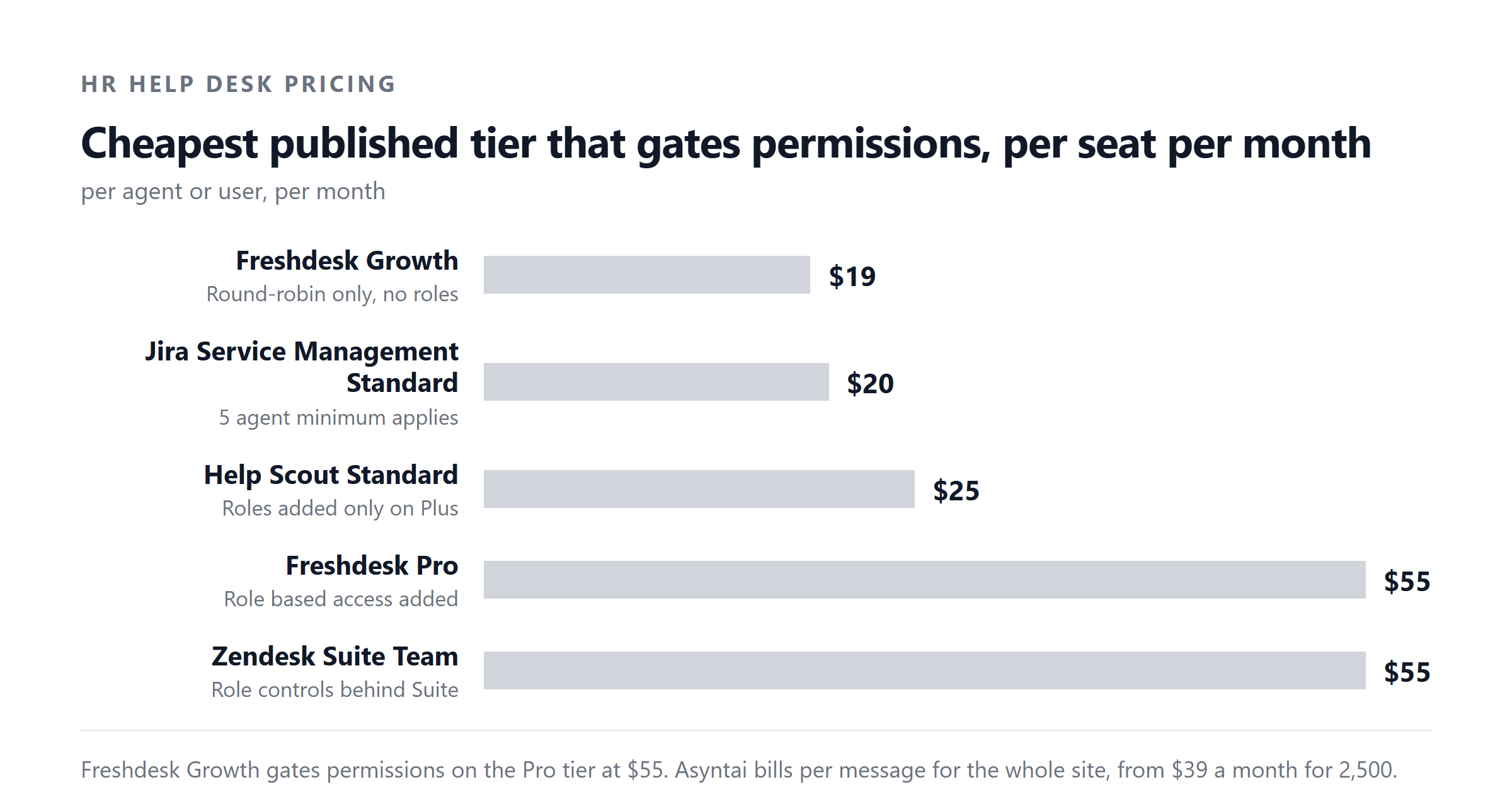
Where the permissions are gated
| Tool | Lowest tier that gates HR permissions | What that tier costs (billed annually) | What is still missing at that tier |
|---|---|---|---|
| Freshdesk | Pro | $55 per agent per month | No field-level redaction; groups and roles exist but no audit-log immutability guarantee. |
| Zendesk | Suite Professional | $115 per agent per month | Sensitive-data redaction is on the enterprise tier, which is a quote-only contract. |
| Help Scout | Plus | $45 per user per month | No native PII redaction; no per-team permission boundary beyond shared inboxes. |
| Jira Service Management | Premium | About $48 to $51 per agent on a sliding scale | Free and Standard tiers do not gate agent-to-queue permissions cleanly. |
| Zoho Desk | Professional | Published in regional currency, not converted here | Field-level redaction lives on the Enterprise plan. |
| Asyntai | All self-serve tiers, including Free | Free (100 messages), Starter $39, Standard $139, Pro $449 per month | Designed as a deflection and triage layer in front of your HR system, with per-website scoping so HR content cannot leak to a non-HR site. |
We make Asyntai, so read that row as a disclosure. Asyntai is an AI chat agent that answers visitor questions on your website. It is a complement to an HR ticket system, not a replacement for one: tickets still route to your HR team, with the chat log attached.
The published prices, side by side
Self-serve only. Enterprise and quote-only contracts are listed in the next section. All figures are per named user per month unless the tool bills differently, and all assume annual billing. Monthly billing is usually 15% to 25% higher.
| Tool | Free | Entry | Mid | Upper | Notes |
|---|---|---|---|---|---|
| Freshdesk | No free plan | $19 | $55 | $89 | Growth, Pro, Enterprise. AI Copilot +$29/agent. Day passes $2, $7, $12. |
| Zendesk | No free plan | $19 | $55 | $115 | Support Team, Suite Team, Suite Professional. Enterprise is quote only. |
| Help Scout | $0 | $25 | $45 | $75 | Free for 5 users / 1 inbox / 100 contacts. Pro has a 10-user minimum. AI Answers $0.75 per resolution. |
| Jira Service Management | $0 | ~$20 | ~$51 | Quote | Free up to 3 agents. Atlassian bills on a seat-count curve, so the per-agent figure moves. |
| Zoho Desk | $0 | Regional | Regional | Regional | Free for 3 users. Paid tiers are published in local currency. |
| Asyntai | $0 | $39 | $139 | $449 | Free 100 messages; Starter 2,500; Standard 15,000; Pro 50,000. Enterprise is a signed order form with a negotiated allowance. |
We make Asyntai, so read that row as a disclosure.
The annual cost at a five-person HR desk
HR desks are usually small. Five named HR agents is a reasonable size for a 250 to 500 employee company. Here is what each tool costs at that size, on its lowest tier that gates permissions, billed annually, with the math shown.
These figures are the published prices only. Real procurement usually adds AI add-ons (Zendesk Copilot +$50/agent, Freshdesk Freddy AI Copilot +$29/agent, Help Scout AI Answers at $0.75 per resolution). For a five-agent HR desk, those add-ons add a meaningful second number on top. Always ask for an itemised quote with the AI line separated from the seat cost.
Enterprise and quote-only contracts
Three of the tools in this market are not fully buyable on a credit card. They require a sales conversation.
- Zendesk Suite Enterprise is quote only. It is also the only Zendesk tier that ships with sensitive-data redaction. If your security team wants field-level redaction, you are on a sales call.
- Freshdesk Enterprise is $89 per agent per month on annual billing and is the only Freshdesk tier with custom roles, IP allow-listing, and a sandbox. Below it, the role model is opinionated.
- Asyntai Enterprise is a signed order form with a negotiated message allowance. It is not on the public pricing page and never will be. If you need a volume contract, an MSA, or a DPA, that is the tier you talk to.
Buying on a quote is not a problem. It is the right shape for a tool that handles HR data. Just make sure procurement asks for the same SLA terms you would expect of any other system of record: data residency, breach notification, sub-processor list, audit-log export.
What to check before signing
Six questions that expose the gap between marketing and reality.
- Show me the role matrix on the tier you are quoting me. If the rep cannot walk you through which roles can read which fields in 10 minutes, the role model is too coarse for HR.
- Who can see a ticket that includes a bank sort code? The honest answer is "only Payroll, with a redaction log entry". If the answer is "all agents in the workspace", the tool is not HR-ready at that tier.
- Can I disable agent-to-agent ticket reassignment across the HR boundary? IT should not be able to move a sensitive HR ticket into their own queue, even by accident.
- What does the audit log export look like? You want a signed, tamper-evident CSV you can hand to a regulator. Not a screen-only view in the agent UI.
- Where is the data stored, and who is the sub-processor list? For UK and EU HR data, this is the question that decides the deal.
- What happens at contract end? You want a documented export of every ticket and every attachment in a portable format, with 30 to 90 days to actually pull it.
Where AI fits, and where it does not
AI belongs at the front door of an HR help desk. Most tickets arrive because someone cannot find the answer they need on the intranet, or they want to ask the question privately without walking into an HR office. A chat agent that can answer "how do I update my bank details" or "what is the parental leave policy" from your published policies takes a large slice of volume out of the queue.
AI does not belong inside the queue. Once a ticket is about a grievance, an accommodation request, or a pay dispute, it needs a human who is accountable for the answer, the redaction decisions, and the audit trail. The tools above are clear about this: AI add-ons are sold as deflection and summarisation, not as case resolution.
Asyntai sits at that front door. It is per-website scoped, so an HR chat on the HR site cannot pull content from a marketing site. It redacts PII from what it stores. It logs every conversation to an append-only audit trail that cannot be edited from the agent UI. It answers policy questions on your site, and routes anything sensitive straight to your HR team with the transcript attached. It is a helpdesk chatbot that deflects tickets before they queue, and it does not pretend to be the queue.
Want a chat agent on your HR site that deflects the easy half and routes the hard half to your team with the transcript attached? See Asyntai pricing or talk to us about an enterprise allowance.
What to actually do this week
If you are mid-procurement, three short moves will tell you what you need to know.
- Build the role matrix first. List the agent roles you actually need (HR Business Partner, Payroll, Line Manager, HR Admin, read-only auditor) and check each shortlisted tool against that matrix on the tier you would actually buy.
- Read the DPA. If a tool's standard DPA does not cover HR categories of data out of the box, you are going to spend more money in legal review than you save on the seat price.
- Pilot for 30 days with a real queue. Not a sandbox with seed data. A real queue, with the redaction rules on, and one HR Business Partner who can tell you whether the tool makes their day easier or harder.
Summary in one paragraph
HR help desk software is priced like other help desk software, but the purchase is decided by access control and a private queue, not by features. Published self-serve prices range from free (Zoho Desk, Help Scout, Jira Service Management up to 3 agents) through $19 per agent (Freshdesk Growth, Zendesk Support Team) up to $115 per agent (Zendesk Suite Professional). Permissions are gated to mid or upper tiers on most tools. Field-level redaction is enterprise on Zendesk and on Zoho Desk. Audit-log immutability is not a standard advertised feature on any of them; ask for it in writing. Asyntai is a per-message AI chat agent that sits at the front door of your HR site, with per-website scoping, PII redaction, and an append-only audit log, from $39 a month self-serve, and on a signed order form above that.